
Set a deny-by-default posture, enforce least privilege, and lock down the management plane before you touch anything else. Every other control on this page, from segmentation to TLS inspection only holds up once those three are in place. The next steps are testing what you built and putting it on a review calendar, because an unreviewed ruleset degrades into a liability within months.
TL;DR:
- Restrict administrative access to management interfaces using dedicated, isolated networks with encrypted protocols and enforce multi-factor authentication for all admin accounts.
- Implement a deny-by-default policy for all zones, scoping each allow rule tightly to specific sources, destinations, ports, and protocols, favoring application-aware rules over broad port-based permissions.
- Maintain a governed ruleset with clear ownership, including naming conventions, lifecycle tags, regular reviews, and documented change management to prevent rule rot over time.
- Enable inspection profiles such as intrusion prevention, deep packet inspection, URL filtering, and DNS protection on all permitted traffic, staging new profiles before deployment to avoid business disruptions.
- Automate continuous monitoring and log forwarding to SIEM with alert thresholds tailored to internal anomalies, enabling proactive detection and response to threats and configuration changes.
Table of Contents
- Firewall Configuration Best Practices Start With the Management Plane
- Enforce a Default-Deny, Least-Privilege Policy Model
- Build a Governed Ruleset That Doesn’t Rot Over Time
- Apply Inspection Profiles to Everything You Allow
- Segment the Network to Stop Lateral Movement
- Implement TLS Inspection Without Breaking Privacy or Trust
- Lock Down Egress Traffic as Tightly as Ingress
- Monitor, Log, and Feed Everything to Your SIEM
- Patch, Maintain High Availability, and Verify Your Backups
- Connect Firewall Policy to Zero Trust and Identity
- Test, Audit, and Prove the Firewall Actually Works
- Adjust the Playbook for Cloud, Branch, and Container Environments
- Why We Think Most Firewall Failures Are Governance Failures, Not Technology Failures
- Get Audit-Ready Firewall Management Without Adding Headcount
- Standards and Guidance Worth Bookmarking
- Sources
- FAQ
Firewall Configuration Best Practices Start With the Management Plane
Attackers do not usually break through your firewall rules. They walk in through the management interface, and once they have admin access, every allow-and-deny rule you built becomes irrelevant. Management-plane compromise is one of the most common paths to a full firewall bypass, which is why it deserves the first line of defense, not an afterthought.
Isolate the management interface on a dedicated VLAN or an out-of-band network that has no route from the general user population. Require multi-factor authentication for every administrator account, no exceptions for “just this once” vendor access. Assign role-based permissions so a help desk technician cannot rewrite core policy, and disable any management service, port, or protocol you are not actively using, including legacy Telnet or unencrypted HTTP consoles.
- Restrict admin access to a management VLAN or out-of-band network with encrypted protocols only
- Enforce MFA on every administrative account, including vendor and contractor logins
- Apply role-based access control instead of shared admin credentials
- Disable unused services, ports, and default accounts on the device itself
- Log every configuration change and forward it to your SIEM in real time
- Enforce short session timeouts so an unattended console doesn’t stay open
Pro Tip: Test your management-plane lockdown by attempting to reach the admin interface from a general user VLAN. If you succeed, you have a segmentation gap, not just a policy gap.
The Canadian Centre for Cyber Security’s firewall guidance treats management-plane isolation as a baseline control, not an advanced one, and that framing is correct.
Enforce a Default-Deny, Least-Privilege Policy Model
The single most important firewall rules best practice is structural: deny everything, then allow only what the business explicitly needs. Start every zone and interface with an implicit or explicit deny-all rule at the bottom of the policy, then build scoped allow entries above it, each one tied to a specific source, destination, port, and business purpose.
Avoid broad rules like “any-to-any” on ports 80 and 443 just because they are convenient. Application-aware rules, which inspect the actual protocol and application rather than trusting a port number, catch traffic that port-based rules miss entirely, since attackers routinely tunnel malicious payloads over common ports. Reserve pure port-based rules for legacy systems that cannot support application identification.
- Write deny-by-default as the base policy for every zone and interface
- Scope every allow rule to a specific source, destination, port, and protocol
- Prefer application-aware rules over port-based rules wherever the platform supports them
- Document the business justification for each rule at creation time, not retroactively
- Set an expiration or review date on any temporary allow entry
NIST SP 800-41 frames this least-privilege model as the foundation of firewall policy design, and it holds up across every environment size, from a five-person clinic to a multi-site distributor.
Build a Governed Ruleset That Doesn’t Rot Over Time
A firewall configured correctly on day one degrades if nobody owns the ruleset afterward. Ownerless rules pile up, nobody remembers why a legacy allow entry exists, and eventually someone is afraid to delete anything. Governance fixes that, and it starts with naming conventions and lifecycle tags.
- Name every rule with owner, purpose, and creation date baked into the naming convention or description field, not buried in a change ticket somewhere.
- Tag rules with an expiry or review date, especially anything created for a project, a vendor engagement, or a temporary workaround.
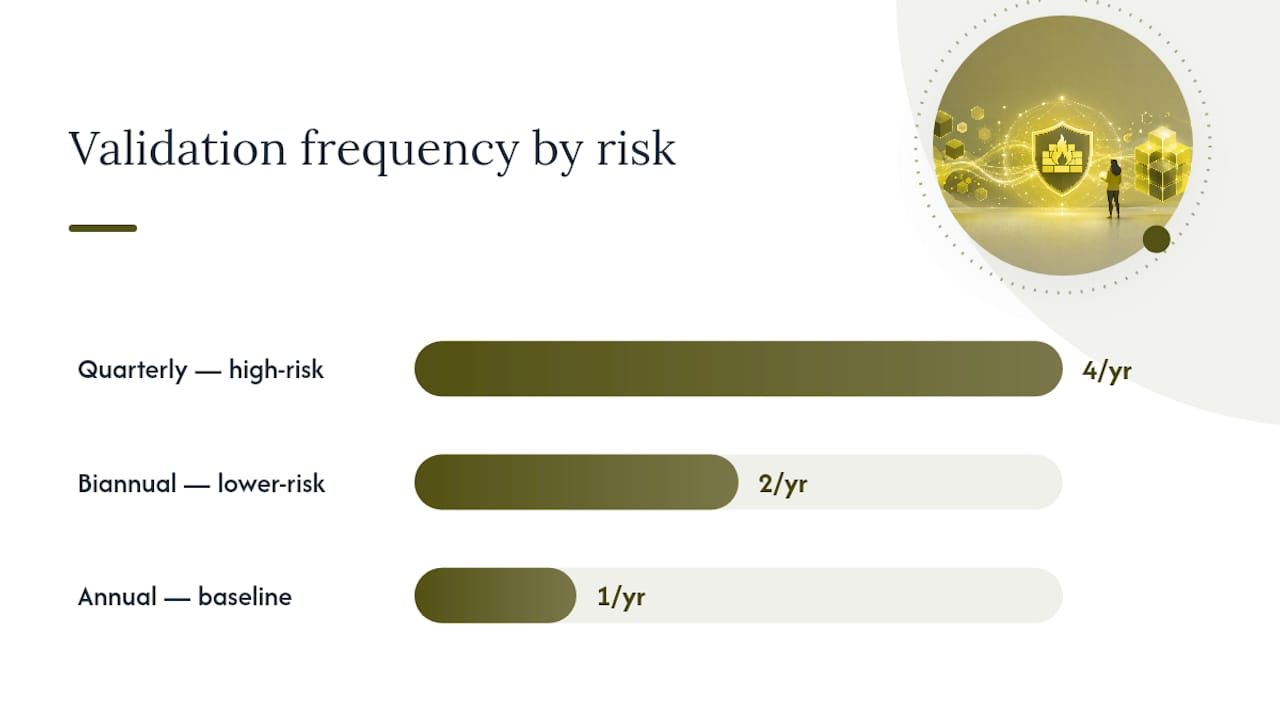
- Review rule-hit counters quarterly at minimum, and biannually at most for lower-risk environments; a rule with zero hits in six months is a candidate for removal.
- Route every rule change through a change-management ticket that documents the request, approver, and rollback plan before it goes live.
- Retire unused rules on a schedule, not “whenever someone notices,” and log the removal the same way you logged the creation.
Pro Tip: If you inherit a ruleset with no naming convention, don’t try to rename everything at once. Tag new rules correctly going forward, and clean up the legacy ones during your next scheduled review cycle.
The Firewall Best Practices compliance guide makes the audit case plainly: reviewers want to see documented change history, not just a clean-looking current state. A ruleset without that paper trail fails an audit even when the actual rules are sound.
Apply Inspection Profiles to Everything You Allow
A deny-by-default policy tells you who gets through the door. Inspection profiles tell you whether what walks through is actually safe. Intrusion prevention (IPS), deep packet inspection (DPI), URL filtering, and DNS protection each catch a different category of threat hiding inside traffic you already decided to permit.
Attach IPS signatures to inbound and internal traffic to catch exploit attempts against known vulnerabilities. Layer DPI on top to inspect payload content rather than just headers. URL filtering blocks access to malicious or noncompliant categories of sites, and DNS protection catches command-and-control callbacks before they resolve.
- Enable IPS on all internet-facing and inter-zone traffic, not just perimeter interfaces
- Use DPI selectively on high-risk segments where payload inspection matters most, since it carries a real performance cost
- Apply URL filtering by category rather than maintaining manual block lists
- Add DNS protection to catch malware callbacks and domain-generation-algorithm traffic
- Stage new inspection profiles in monitor-only mode before switching to block mode
Roll out any new profile in a staging window first. Turning on aggressive DPI in production without testing has broken more legitimate business applications than it has stopped active attacks, and that kind of outage erodes trust in security tooling fast. Document every exception you grant, including the business reason and an expiration date, so the exception list doesn’t become a second, ungoverned ruleset.
Segment the Network to Stop Lateral Movement
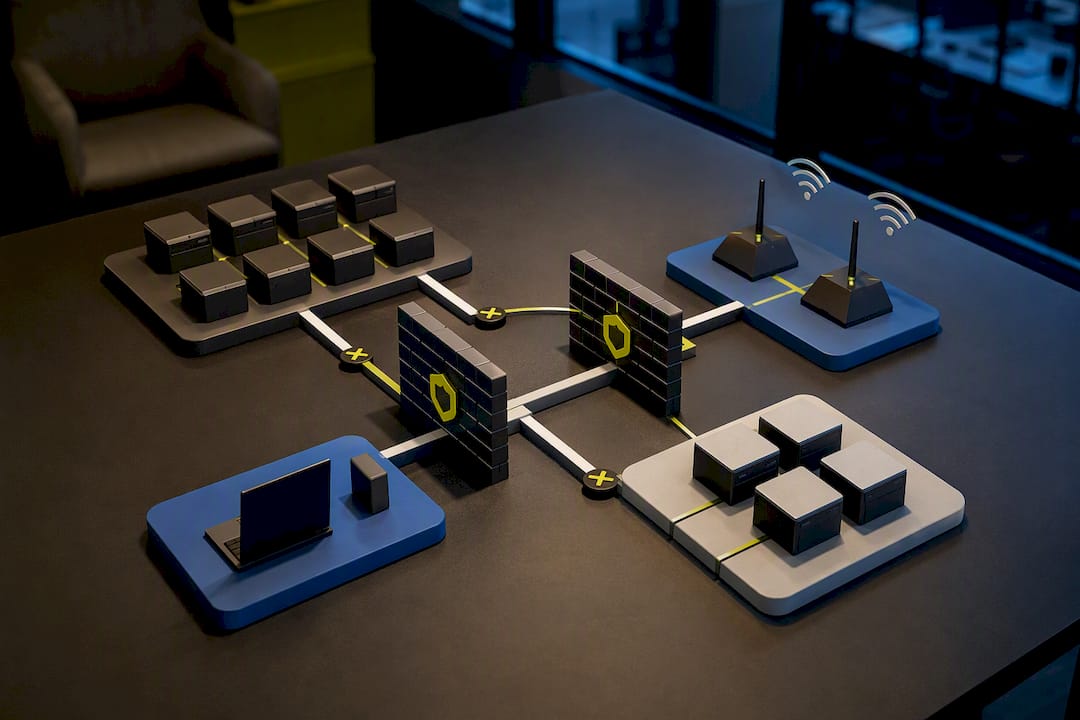
Perimeter defense stops outsiders. Segmentation stops an intruder who is already inside from reaching everything else. Once ransomware or a compromised account lands on one workstation, the question that determines the damage is simple: what else can that device reach?
Define trust zones based on data sensitivity and function, separating user workstations, servers, guest Wi-Fi, IoT devices, and payment systems into distinct VLANs or zones. Then restrict east to west traffic between those zones the same way you restrict traffic at the perimeter, with explicit allow rules rather than open trust between internal segments. Microsegmentation, which applies granular policy at the individual workload or host level, adds another layer for your highest-risk assets, like domain controllers and database servers.
- Map every asset to a defined trust zone before writing inter-zone rules
- Restrict east to west traffic with the same default-deny logic as north to south traffic
- Apply microsegmentation to domain controllers, backup servers, and payment processing systems
- Verify isolation by attempting lateral movement from a test device during scheduled audits
- Keep guest and IoT networks fully isolated from internal production zones
Pro Tip: Run a quarterly lateral-movement test using a sacrificial test device on your general user VLAN. If it can reach your file server or domain controller directly, your zones exist on paper but not in practice.
Network segmentation is also where firewall policy connects to broader network security architecture, since zoning decisions ripple into how you design switching, wireless, and remote access.
Implement TLS Inspection Without Breaking Privacy or Trust
Most traffic crossing your firewall today is encrypted, which means most threats are also hiding inside that encryption. TLS inspection, sometimes called SSL decryption, lets your firewall unwrap that traffic, inspect it, and re-encrypt it before it reaches its destination. It is powerful, and it is also the control most likely to generate a compliance or privacy complaint if you deploy it carelessly.
Decrypt traffic where the risk justifies it: general web browsing, unmanaged SaaS traffic, and anything crossing into your DMZ. Exempt categories where privacy law or ethics demand it, including healthcare portals, banking sites, and personal webmail, and document that exception list explicitly rather than leaving it to individual administrator judgment.
- Build a documented exception list for healthcare, banking, and legally sensitive traffic categories
- Deploy your internal certificate authority correctly so decrypted traffic doesn’t trigger constant browser warnings
- Test decryption against your actual business applications before enabling it broadly, since some apps use certificate pinning that breaks under inspection
- Review the exception list at the same cadence as your firewall ruleset, not separately
- Communicate the decryption policy to staff and legal or compliance stakeholders before rollout
Skipping this step doesn’t just create a blind spot. It also creates a documentation gap that regulators and auditors will flag the moment they ask how you handle encrypted traffic inspection.
Lock Down Egress Traffic as Tightly as Ingress
Most firewall rules best practices conversations focus on what gets in. What gets out matters just as much, because data exfiltration and command-and-control traffic both depend on unrestricted egress. A firewall that blocks every inbound threat but allows unrestricted outbound connections is only doing half its job.
Allow-list approved outbound destinations rather than permitting general internet access from every server and workstation. Block direct-to-IP outbound connections that bypass your DNS layer entirely, since that pattern is a common exfiltration technique. Force all DNS queries through approved internal resolvers, and watch for anomalies like unusually long subdomains or high query volume to a single unfamiliar domain, both classic signs of DNS tunneling.
- Allow-list outbound destinations for servers instead of permitting open internet access
- Block direct-to-IP outbound traffic that skips DNS resolution
- Force all DNS traffic through approved internal or filtered resolvers
- Monitor DNS query patterns for tunneling indicators like abnormal subdomain length or volume
- Require vendor remote access through jump hosts or time-limited VPN sessions, never a standing open port
Vendor access deserves particular attention here. A vendor who needs firewall access for a project should get a time-boxed VPN credential and a jump host, not a permanent rule that outlives the engagement by two years, which is how most orphaned high-risk rules get created in the first place.
Monitor, Log, and Feed Everything to Your SIEM
A firewall that blocks threats silently is only half useful. The other half of network firewall best practices is visibility: knowing what happened, when, and whether it demands a response. Forward denies, admin changes, and anomalous traffic patterns to your SIEM continuously, not in a weekly export.
Focus your logging on signal, not volume. Denied connection attempts from internal hosts matter more than routine denied scans from the open internet, since the former often indicates a compromised device trying to reach something it shouldn’t. Configuration changes, especially outside a documented change window, deserve an immediate alert rather than a line in a report someone reads next Monday.
- Forward all deny events, admin logins, and configuration changes to your SIEM in real time
- Tune logging filters to suppress routine internet noise while preserving internal anomaly detail
- Set alerts for configuration changes made outside an approved change window
- Alert on repeated denies from a single internal host, which often signals compromise
- Retain logs long enough to satisfy your regulatory retention requirement, not just your storage budget
The CIS Controls v8.1 framework lists continuous monitoring and boundary defense among its highest-priority safeguards, and that prioritization exists because undetected dwell time, not the initial breach, is what turns an incident into a catastrophe. An escalation path that routes a genuine SIEM alert to an on-call engineer within minutes, rather than a shared inbox nobody checks over the weekend, is the difference between an incident and a headline.
Patch, Maintain High Availability, and Verify Your Backups
Firewall firmware vulnerabilities get exploited fast once a proof of concept circulates publicly, and a firewall running six-month-old firmware is a known, documented risk sitting on your perimeter. Patching cadence matters as much as any rule you write.
- Stage every firmware update in a test environment or maintenance window before pushing it to production, since vendor patches occasionally break existing rule logic.
- Maintain a documented rollback plan for every update, including a tested path back to the previous firmware version.
- Configure high availability in active-passive or active-active pairs for any firewall protecting production traffic, and test failover on a schedule, not just at initial setup.
- Document your recovery time objective and recovery point objective for firewall failure specifically, separate from your general disaster-recovery plan.
- Automate configuration backups after every change, and store them somewhere separate from the device itself, encrypted and access-controlled.
A firewall with perfect rules and no tested failover is still a single point of failure. Run the failover test quarterly, and treat a failed test as seriously as a failed audit, because it usually means the same thing will fail during a real outage.
Connect Firewall Policy to Zero Trust and Identity
Static IP-based rules assume the network perimeter still means something, and for most organizations, it stopped meaning that years ago. Zero Trust architecture ties access decisions to identity and device posture instead of network location alone, and modern firewalls increasingly support that model directly.
Map firewall policy to Active Directory or LDAP groups, and to cloud identity providers for hybrid environments, so a rule change follows an HR change automatically instead of waiting for a manual ticket. Dynamic address groups, which update membership automatically based on tags rather than static IPs, keep policy accurate as workloads and devices move. Combining that with endpoint posture checks, verifying a device has current patches and active endpoint protection before granting access, closes the gap between “who is this” and “is this device safe to trust right now.”
- Map firewall rules to AD, LDAP, or cloud identity groups instead of static user lists
- Use dynamic address groups tagged by workload or role rather than hardcoded IPs
- Require endpoint posture checks before granting access to sensitive zones
- Reassess group-based policy automatically when identity provider group membership changes
Test, Audit, and Prove the Firewall Actually Works
A firewall configuration that looks correct on paper and a firewall configuration that actually stops attacks are not always the same thing, and the only way to know which one you have is to test it deliberately and repeatedly.
Every change belongs in staging first. Validate that the new or modified rule does what it is supposed to do, confirm it doesn’t break an existing business flow, and document a rollback trigger before the change ever reaches production. Skipping staging to save time is how a single rule change takes down a shift’s worth of point-of-sale traffic.
Beyond change-by-change validation, schedule broader assessments:
- Run internal or third-party penetration testing against your perimeter and internal segmentation at least annually, more often for regulated environments handling payment or health data
- Review rule-hit analytics quarterly to find unused, overly permissive, or shadowed rules
- Retain audit evidence, change tickets, review logs, and test results for the full duration your compliance framework requires
- Validate that logging and SIEM forwarding are still functioning correctly, since a silent logging failure can go unnoticed for months
- Match your testing frequency to actual risk: high-risk regulated environments warrant quarterly deep reviews, lower-risk internal networks can run on a biannual cycle
Pro Tip: Keep a standing folder of audit evidence, change tickets, hit-count exports, and test results, updated continuously rather than assembled in a panic the week before an auditor calls.
NIST SP 800-41 explicitly frames testing and management as ongoing operational responsibilities, not a one-time deployment task, and that framing should shape how you budget time for firewall administration going forward. A network security checklist built around recurring validation, rather than a one-time setup, is what actually holds up during an incident.
Adjust the Playbook for Cloud, Branch, and Container Environments
Every principle above still applies once you move into cloud, multi-branch, or containerized infrastructure, but the tooling and enforcement points shift. Cloud-native environments replace static IP rules with tag-driven policy, since workloads spin up and down too fast for manual IP management to keep pace.
Cloud firewall managers, offered by every major cloud provider, let you apply consistent policy across auto-scaling workloads using tags and labels instead of addresses. Understand the shared-responsibility boundary clearly: your cloud provider secures the underlying infrastructure, but you own the security group rules, network ACLs, and workload-level firewall policy sitting on top of it.
- Use tag-driven or label-driven policies for cloud and container workloads instead of static IP rules
- Centralize policy management across cloud, branch, and on-premises firewalls to avoid drift between sites
- Confirm inspection actually occurs on east-west traffic inside container orchestration platforms, where default configurations often skip it
- Apply the same change-management and review cadence to cloud firewall policy as you do on-premises
- Verify branch firewalls receive the same patch and firmware cadence as headquarters equipment, not a delayed schedule
Branch offices deserve particular attention, since a smaller site with no on-site IT staff often runs the oldest firmware and the least-reviewed ruleset in the entire organization. Centralized management consoles exist specifically to prevent that drift, and using one consistently is worth more than any individual rule you could write for a branch firewall.
Why We Think Most Firewall Failures Are Governance Failures, Not Technology Failures
After years of walking into environments after something has already gone wrong, a pattern repeats more than any other: the firewall hardware was rarely the problem. The rules were. Specifically, rules nobody owned, nobody reviewed, and nobody could explain six months after they were created.
The industry tends to sell firewall security as a technology decision, a matter of picking the right vendor or the right feature set. We think that framing undersells the real risk. A mid-range firewall with a disciplined change-management process and a quarterly review cadence will outperform a premium appliance running a ruleset that hasn’t been touched since the last audit. Governance beats hardware almost every time, and most breaches involving a “firewall failure” trace back to a rule that was too permissive, too old, or never documented in the first place.
The harder truth is that most internal IT teams know exactly what needs fixing here and still don’t get to it, not from negligence, but because patching, monitoring, and quarterly rule reviews compete against every other fire on an admin’s plate. That is precisely why regulated organizations in healthcare and finance increasingly hand this specific function to a managed partner: not because internal teams can’t do it, but because consistency requires dedicated time that a stretched internal team rarely has.
— 247techify Team
Get Audit-Ready Firewall Management Without Adding Headcount
Every practice on this page takes real, ongoing hours: quarterly rule reviews, staged testing, SIEM tuning, patch validation, failover drills. Most internal IT teams have the knowledge to do it and not the bandwidth to do it consistently, which is exactly the gap 247techify closes for Canadian businesses. Instead of one admin trying to squeeze firewall governance between help desk tickets, you get 24/7 monitoring, a documented review cadence, and a response time under 30 minutes when something needs immediate attention.

247techify builds managed firewall policy management around the same governance model covered above: default-deny baselines, documented change tickets, scheduled rule reviews, and SIEM-forwarded logging with real alerting behind it, not just a dashboard nobody watches. For healthcare and finance clients, that includes mapping firewall controls directly to HIPAA and PCI-DSS compliance requirements, so your audit evidence is already assembled instead of scrambled together the week an auditor calls.
Getting started is straightforward: a network assessment identifies gaps against the practices above, a remediation plan prioritizes the highest-risk fixes first, and ongoing managed operations keep the ruleset governed instead of letting it drift again. If your team is stretched thin on firewall governance, explore 247techify’s managed IT services or reach out to scope an assessment.
Standards and Guidance Worth Bookmarking
For teams building or auditing a firewall program, a handful of primary sources are worth keeping on hand. NIST SP 800-41 remains the definitive federal guideline on firewall policy design, selection, and testing. The Canadian Centre for Cyber Security’s ITSAP.80.039 offers Canada-specific deployment and configuration guidance directly relevant to domestic compliance expectations. The CIS Controls v8.1 framework prioritizes boundary defense and continuous monitoring actions in a sequence that helps smaller teams focus resources where they matter most. For practical, vendor-neutral operational checklists, the Netgate pfSense best-practices documentation and Mavericks Office Solutions’ firewall management playbook both offer grounded, implementation-level detail.
Sources
- NIST SP 800-41 Rev. 1 — Guidelines on Firewalls and Firewall Policy
- Firewall security considerations - ITSAP.80.039
- CIS Controls v8.1
- Firewall Best Practices: Config & Compliance Guide
FAQ
What are the best practices for configuring firewall rules?
Build every rule around default-deny and least privilege: scope each allow entry to a specific source, destination, and port, document its business justification, and set a review or expiry date so it doesn’t outlive its purpose.
How should a firewall be configured?
Start with a deny-all baseline, add scoped allow rules for known business needs, harden the management plane with MFA and network isolation, and layer inspection profiles like IPS and URL filtering on top of everything you permit.
What are the best firewall settings to use?
There’s no universal setting list, since the right configuration depends on your traffic and risk profile, but default-deny, application-aware rules over pure port-based rules, and enabled logging with SIEM forwarding apply almost universally.
What are the top three firewall best practices every organization should follow?
Enforce default-deny with least-privilege rules, harden and MFA-protect the management plane, and establish a recurring rule-review and testing cadence, since a firewall that isn’t reviewed regularly degrades into a liability within months.
How often should firewall rules be reviewed?
Reviews should be conducted regularly, with more frequent assessments recommended for higher-risk or regulated environments, while lower-risk internal environments may have longer intervals; in all cases, hit-counter analysis helps identify unused rules for removal.