
Measure first. Then rightsizing plus the right commitment strategy and governance layer deliver the biggest Azure savings. Start with Cost Management cost analysis and exports to see where money actually goes, act on Azure Advisor’s high-impact rightsizing and shutdown recommendations, and only then buy reservations or savings plans against the rightsized baseline. Mid-market estates that run this sequence in a focused 60-day push typically pull 20 to 35 percent out of the bill without touching production stability.
TL;DR:
- Focusing on cost analysis, high-impact rightsizing recommendations, and zero-risk cleanup within 60 days can typically yield a 20 to 35 percent reduction in Azure bills.
- Accurate measurement through detailed cost exports and proper tagging is essential to identify top spend drivers and size compute commitments correctly.
- Eliminate waste by shutting down idle VMs, removing orphaned disks, and moving snapshots to lower-cost storage, especially in dev and testing environments.
- Purchase reservations for stable, consistent workloads only after rightsizing, and layer savings plans on variable usage to maximize discounts while avoiding overcommitment.
- Ongoing governance with budgets, anomaly alerts, and tag enforcement protects savings from erosion and ensures continuous optimization efforts.
Table of Contents
- What Is the Fastest Way to Start Azure Cost Optimization?
- Where Do You Find the Data That Drives Every Decision?
- How Do You Eliminate Wasted Azure Spend?
- Reservations or Savings Plan: Which Commitment Fits?
- What Storage and Backup Changes Are Actually Low Risk?
- How Do Networking Costs Quietly Add Up?
- What Governance Keeps Savings From Disappearing?
- Which Azure Tools Actually Run This Playbook?
- What Does a 30 to 60 Day Optimization Schedule Look Like?
- Why a Security-First Managed Approach Reduces Risk During Optimization
- Get Help Running the Azure Cost Optimization Playbook
- Sources
- FAQ
What Is the Fastest Way to Start Azure Cost Optimization?
You do not need a six-month consulting engagement to start cutting Azure spend. You need a ranked list of moves, ordered by how fast they pay off and how little risk they carry, and you need to work down that list in order.
Here is the sequence that gets results without a change advisory board meeting for every step:
- Pull 14 to 30 days of cost data and rank the top 10 line items by spend. This is almost always compute, storage, or a networking surprise nobody flagged.
- Apply every Azure Advisor “High” impact recommendation first. Rightsizing suggestions and reservation prompts carry the biggest dollar impact per hour of effort.
- Take the zero-risk wins immediately. Delete unattached disks and snapshots past retention, turn on blob lifecycle policies, and trim per-table Log Analytics retention where nobody is querying old logs anyway.
- Lock in light governance before you do anything else. Required tags through Azure Policy, budgets, and anomaly alerts stop today’s savings from quietly eroding next quarter.
Pro Tip: Run the zero-risk storage and log-retention cleanup in the same week you pull cost data. It funds the political capital you need to push harder rightsizing and governance changes through change management later.
That order matters more than the individual actions. Governance without visibility is guesswork. Rightsizing without governance is a savings number that decays within a quarter.
Where Do You Find the Data That Drives Every Decision?
Every optimization decision downstream, rightsizing, purchasing, governance, depends on getting the measurement layer right first. Get sloppy here and you will rightsize the wrong VM or buy a savings plan sized for last month’s traffic spike.
Start in Cost analysis inside Cost Management, grouped by service, resource group, and tag. Export both daily and hourly spend for a 14 to 30 day window. Daily granularity tells you which resource groups are expensive; hourly granularity is what you need later to size compute commitments correctly.
Compute spend needs a closer look than storage does. Pull hourly compute cost and calculate your P70 and P95 usage levels, because these percentiles are what determine how much you should commit to a Savings Plan versus leaving as pay-as-you-go. For automation, the Cost Details, Query, and Exports APIs let you build recurring dashboards instead of pulling manual CSVs every month.
Tags are the piece teams skip and regret. Set up tag inheritance from resource groups or management groups, then enforce it with Azure Policy so nothing new lands untagged. Without reliable tags, chargeback and allocation reporting fall apart the moment a team spins up a new subscription.
| Data pull | Time window | Primary use |
|---|---|---|
| Cost analysis by service/tag | 14 to 30 days | Identify top spend drivers |
| Hourly compute spend | 14 to 30 days | Calculate P70/P95 for commitment sizing |
| Advisor recommendations export | Current snapshot | Prioritize rightsizing and reservation actions |
| Tag compliance report | Ongoing | Verify allocation accuracy before chargeback |
Before you touch a purchasing decision, separate your compute baseline into a stable floor and a variable, bursty layer. That split is the entire foundation for the reservation versus savings plan decision later.
How Do You Eliminate Wasted Azure Spend?
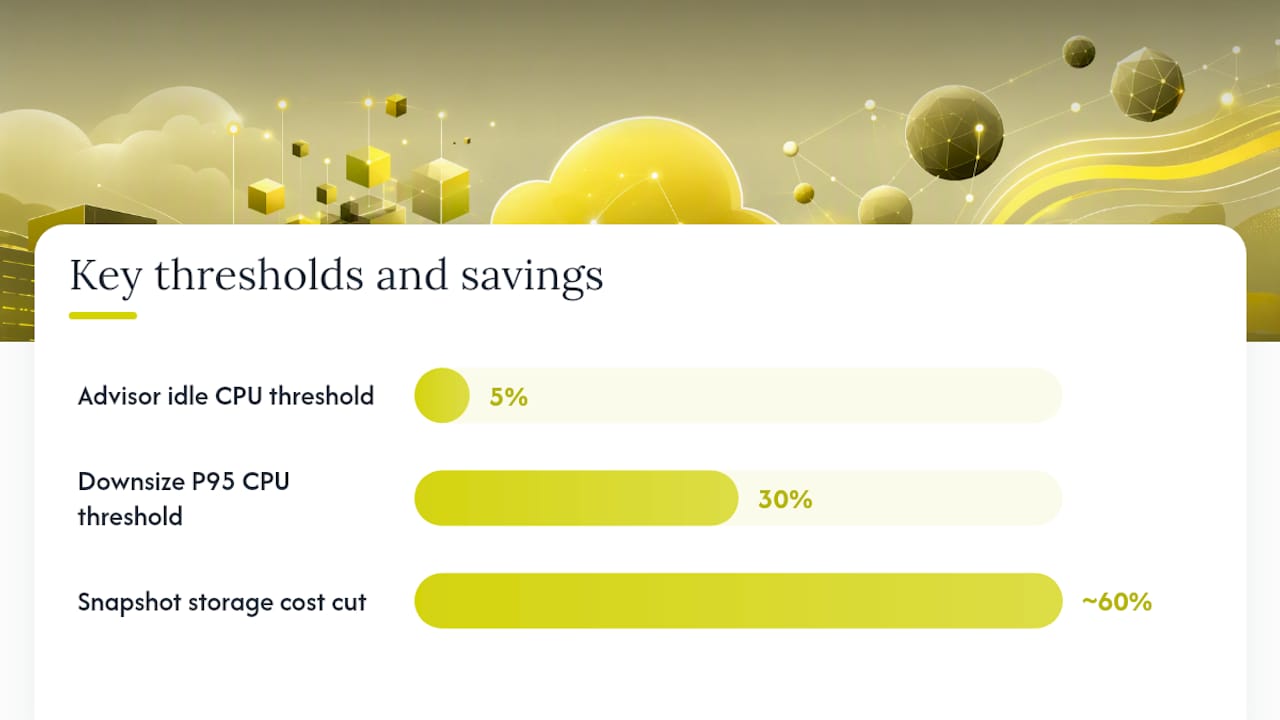
Waste hides in three places: idle compute, orphaned storage, and orchestration layers running at full size around the clock. Azure Advisor flags underutilized VMs using CPU and network thresholds, specifically machines sitting at 5 percent CPU or below with minimal network throughput across several days, and lists potential yearly savings next to each one. Treat those Advisor candidates as a starting list, then verify with your own P95 CPU and memory data. A common working threshold: if P95 CPU sits under 30 percent for two consecutive weeks, that VM is a legitimate downsize candidate, not just an Advisor false positive.
Dev and test environments are the easiest win in most estates because nobody needs them running at 2 a.m. on a Saturday.
- Schedule automated shutdown for every dev/test VM outside business hours using tag-driven automation or Azure DevTest Labs.
- Enable the cluster autoscaler on every AKS cluster instead of running fixed node counts sized for peak load.
- Use spot node pools for interruptible batch or CI workloads. AKS start/stop on non-production clusters removes the “just leave it running” tax entirely.
- Sweep for unattached disks and snapshots older than 30 days. These accumulate silently after every VM deletion nobody fully cleans up.
Pro Tip: Moving old snapshots to Standard Storage instead of Premium can cut snapshot storage costs by roughly 60 percent where performance requirements allow it. It is one of the few changes with almost zero operational risk.
None of this requires a change freeze. It requires someone owning the list and working through it methodically instead of once a year during a budget scare.
Reservations or Savings Plan: Which Commitment Fits?
Buy nothing until rightsizing is done. That single rule prevents the single most common mistake in Azure cost management: locking in a three-year commitment against an oversized VM you were about to shrink anyway.
Once your baseline is verified, the choice comes down to how stable your workload is. Reservations commit you to a specific VM family and region in exchange for the deepest discount, up to roughly 72 percent off list price, higher still with Azure Hybrid Benefit on eligible Windows Server or SQL workloads. Azure Savings Plan for compute works differently: you commit to an hourly dollar amount rather than a specific instance family, and it covers a broader range of compute resources with more flexibility, saving up to around 65 percent.
The practical purchase sequence Microsoft documents runs like this:
- Rightsize first and remove waste, since buying against bloated usage locks in the wrong number.
- Reserve the stable floor, the workload that runs 24/7 regardless of season or campaign.
- Layer a savings plan over the variable portion above that floor.
- Azure applies reservation discounts before savings plan discounts when both exist on the same usage, so sequencing them correctly avoids double-paying for coverage you already have.
For sizing the savings plan commitment, use your P70 to P75 hourly compute spend as the starting hourly rate, then review monthly and adjust as usage shifts. If reservation utilization drops below 95 percent, that is your signal to investigate an exchange or resale rather than letting the unused portion quietly waste money for the rest of the term.
What Storage and Backup Changes Are Actually Low Risk?
Storage optimization rarely threatens uptime the way compute rightsizing can, which makes it the section most teams should tackle without waiting for a change window.
- Turn on Blob lifecycle management with a staged Hot to Cool to Archive policy. A common pattern moves data to Cool after 30 days of no access and to Archive after 90, adjusted to your own access patterns.
- Migrate old snapshots to Standard Storage and delete snapshots tied to disks that no longer exist. This is nearly always found alongside the unattached disk cleanup from the previous section.
- Reassess backup redundancy for non-critical workloads. Geo-redundant storage costs meaningfully more than locally redundant storage, and not every dataset needs geo-redundancy.
- Audit Log Analytics ingestion volume and retention settings, and move to commitment tiers or a dedicated cluster if you are consistently ingesting at high volume.
None of these changes require touching a production compute instance, which is exactly why they belong early in your sequence.
How Do Networking Costs Quietly Add Up?
Networking is the category most cost reviews skip, and it is often where the surprises live. Egress charges, NAT Gateway hours, and oversized gateways accumulate in small increments that never trigger an alert until the monthly bill lands.
Start by identifying your top egress contributors in Cost analysis. If a handful of services are driving most of your outbound data transfer, putting a CDN or Azure Front Door in front of them can cut origin egress substantially by serving cached content closer to users. Check whether your container registry is regional, cross-region ACR pulls generate transfer charges that a simple regional alignment eliminates entirely. Review NAT Gateway usage and peering patterns for redundant paths nobody is actively using.
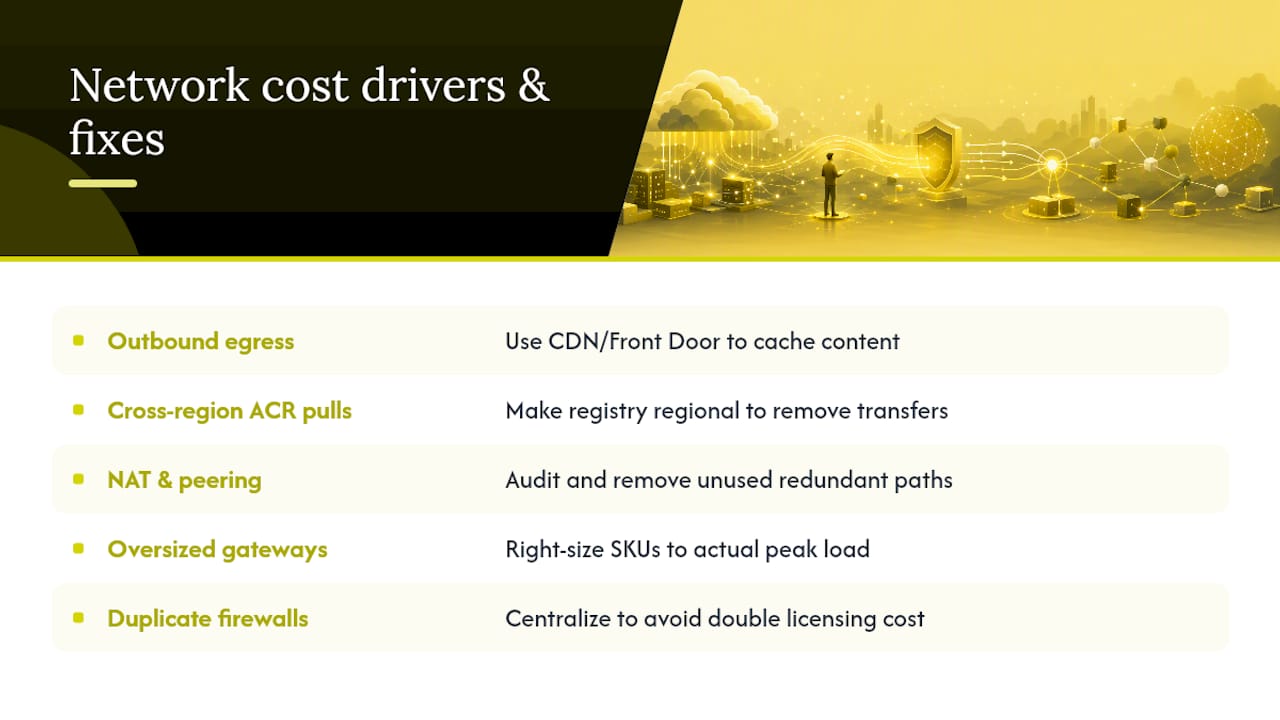
Application Gateway and Firewall SKUs deserve a second look too. Teams often provision at a size meant for peak load that never materializes, and running duplicate regional firewall instances instead of a centralized model doubles licensing cost for redundant protection.
What Governance Keeps Savings From Disappearing?
Every optimization project eventually faces the same problem: the savings from month one erode by month four because nobody is watching for drift. This is where FinOps governance earns its keep, not as a compliance exercise but as the mechanism that protects the work you already did.
Set budgets and anomaly alerts at the subscription and resource-group level, and connect them to action groups that can trigger automated responses instead of just sending an email nobody reads. Enforce required tags through Azure Policy so every new resource lands with owner, environment, and cost-center metadata attached, and surface that tagging in your regular exports so chargeback numbers hold up under scrutiny.
Build two recurring cadences instead of one big annual review:
- A monthly reservation and savings plan utilization check to catch drift before it compounds.
- A quarterly optimization sprint that revisits Advisor recommendations, storage lifecycle rules, and AKS scaling settings against current usage.
Pro Tip: Assign a named FinOps owner separate from the platform team. When cost review and infrastructure delivery sit with the same person, cost review loses every time deadlines get tight.
Define who owns what: a FinOps lead for the numbers, the platform team for execution, and resource owners accountable for justifying their own line items. The Well-Architected cost optimization principles frame this correctly: cost management is a continuous governance discipline, not a project with an end date.
Which Azure Tools Actually Run This Playbook?
You do not need third-party tooling to execute most of this plan. Azure’s native stack covers nearly every step if you know where to point it.
Cost Management handles the measurement layer: Cost analysis for exploration, Budgets for guardrails, and the Exports API for automated recurring pulls into your own dashboards. Azure Advisor is your recommendation engine for rightsizing, reservation purchases, and idle resource detection. The Cost Optimization workbook layers both together into a single view so you are not toggling between five blades to build a monthly report.
For the repetitive work, automate it:
- Scheduled shutdowns for non-production VMs and AKS clusters, driven by tags rather than manual tickets.
- Recurring reservation and savings plan utilization checks that flag drops below your target threshold automatically.
- Anomaly detection pipelines feeding alerts into the action groups covered in the governance section above.
Azure CLI or PowerShell scripting covers the gap between “Advisor made a recommendation” and “someone actually applied it.” Low-risk recommendations like storage tier changes are strong candidates for scripted, policy-driven remediation instead of manual tickets sitting in a backlog.
What Does a 30 to 60 Day Optimization Schedule Look Like?
A realistic timeline keeps this from becoming a permanent someday project. Here is a sequence that mid-market teams can run without a dedicated cloud economics headcount:
- Days 1 to 7: Pull cost data, identify the top spend drivers, and knock out zero-risk fixes: orphaned disks, expired snapshots, blob lifecycle rules.
- Days 8 to 21: Rightsize compute and database instances, tune AKS autoscaling, and shift eligible batch workloads onto spot node pools.
- Days 22 to 45: Roll out governance: tagging enforcement, budgets, and anomaly alerts across every subscription in scope.
- Days 46 to 60: Purchase reservations and savings plans against the now-verified baseline, then re-measure and report the results.
Sixty days is enough time to see whether the 20 to 35 percent reduction that shows up in typical mid-market audits is holding for your own estate, without waiting a full budget cycle to find out.
Why a Security-First Managed Approach Reduces Risk During Optimization
Rightsizing a VM, scheduling a restart, or switching backup redundancy all carry a small chance of breaking something in production. That risk is real even when the change looks routine on paper, and it is exactly where a managed team with security-first discipline earns its value: catching a misconfigured autoscaler or a backup gap before it becomes an incident rather than after.
247techify pairs that operational care with 24/7 support and a sub-30-minute average response time, along with compliance experience in regulated sectors like healthcare and finance where a botched storage redundancy change carries real consequences. If you are unsure whether your team can absorb that risk internally, piloting the changes on one workload before a full rollout is the safer path.
— 247techify Team
Get Help Running the Azure Cost Optimization Playbook
Reading a playbook and executing it under production constraints are two different problems. Managed Azure support can provide execution for discovery, rightsizing, and governance changes with security-first discipline, helping ensure cost changes do not become incident reports.

A typical engagement starts with a Discovery assessment to map your actual cost drivers and risk points, priced at $1,500 CAD one time and detailed on the AI and managed services page. From there, ongoing execution runs through Business managed IT plans, listed from $1,099 to $2,499 CAD per month on the managed IT pricing index, covering the day-to-day monitoring, backup validation, and change management that keeps optimization gains from eroding. If backup redundancy or retention changes are part of your storage cleanup, Automated Cloud Backup support makes sure those changes are validated, not just applied and forgotten.
Check current pricing and plan details on the pricing page and start with a discovery conversation before committing to a full rollout.
FAQ
How Do You Reduce Costs in Azure?
Start by measuring spend with Cost analysis and exports, then act on Azure Advisor’s high-impact rightsizing and shutdown recommendations before buying any reservations or savings plans. Layering storage lifecycle cleanup and networking fixes on top of that sequence is what produces the 20 to 35 percent reductions typical of a focused 60-day effort.
What Are the Four Pillars of Cloud Cost Optimization?
Most FinOps frameworks converge on visibility (measurement), waste elimination (rightsizing and cleanup), rate optimization (reservations and savings plans), and governance (budgets, tagging, and ongoing review). This article follows that same sequence, since skipping the order tends to lock in savings against the wrong baseline.
Is AWS or Azure Cheaper?
Direct pricing comparisons depend heavily on workload type, region, and how aggressively a team applies rightsizing and commitment discounts on either platform, so a blanket answer misleads more than it helps. What actually determines your bill on Azure is how disciplined you are about rightsizing before committing to reservations or savings plans, not the platform’s list price alone.
What Is Cloud Cost Optimization?
Cloud cost optimization is the ongoing practice of matching cloud spend to actual business need, measuring usage, removing waste, committing to discounts only where usage is stable, and governing spend so it does not drift back up. The Azure Well-Architected Framework treats it as a continuous discipline rather than a one-time cleanup project.
Should I Buy a Savings Plan or a Reservation First?
Rightsize your workload first, then reserve the stable, predictable portion of your compute usage and cover the variable layer above it with a Savings Plan. Azure applies reservation discounts before savings plan discounts on overlapping usage, so buying in that order avoids paying for coverage you already have through the reservation.