
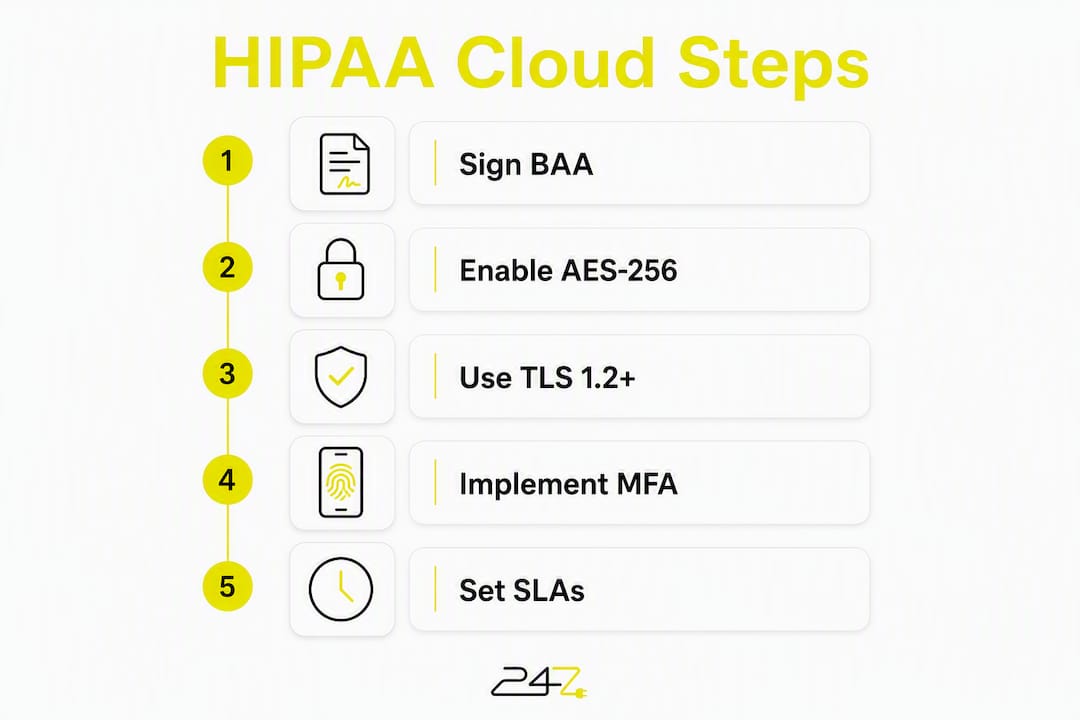
Choose a HIPAA-ready cloud storage solution that signs a Business Associate Agreement (BAA), supports AES-256 at rest and TLS 1.2+ for data in transit, enforces MFA and RBAC, and provides immutable backups. Those five controls are the non-negotiable baseline under HIPAA’s Security Rule — every other feature is secondary until these are confirmed.
Three immediate actions before your next vendor call:
- Request a signed BAA — HHS confirms no vendor may handle ePHI without one under 45 CFR 164.402.
- Ask for the vendor’s security specification sheet confirming AES-256 at rest and TLS 1.2+ in transit.
- Schedule a migration scoping call or compliance review to map your current ePHI inventory before any data moves.
Table of Contents
- What do medical practice cloud storage solutions require for HIPAA compliance?
- Which security features should you evaluate in depth?
- How does tiered storage reduce imaging costs for your practice?
- Public, private, or hybrid cloud — which model fits your practice?
- How do you vet and shortlist cloud storage vendors?
- What does a phased migration plan look like for patient records?
- How do immutable backups protect against ransomware?
- What integration checks does your EHR and PACS migration require?
- Why does a cybersecurity-first managed IT partner reduce your compliance risk?
- What is your 30/60/90-day action plan?
- How should you train staff for secure cloud adoption?
- What data residency rules apply to US healthcare providers?
- How do you avoid vendor lock-in and protect data portability?
- Key Takeaways
- The case for security-first managed services in healthcare cloud
- 247techify brings HIPAA-ready managed IT to your practice
- FAQ
What do medical practice cloud storage solutions require for HIPAA compliance?
| Requirement | Standard | What to Verify |
|---|---|---|
| Business Associate Agreement | 45 CFR 164.402 | Signed before any ePHI is transmitted |
| Encryption at rest | AES-256 | Confirmed in vendor security spec sheet |
| Encryption in transit | TLS 1.2+ | Applies to all ePHI transfers |
| Access controls | MFA + RBAC | Role definitions documented |
| Audit logging | HIPAA Security Rule | Logs retained, exportable on request |
| Backup / recovery | Immutable object lock | Retention windows and RTO/RPO defined in SLA |
| Third-party validation | SOC 2 Type II or HITRUST CSF | Current report available on request |
Pro Tip: During procurement, request the vendor’s most recent SOC 2 Type II report and a sample audit log export. A vendor that hesitates to share either is a red flag worth acting on immediately.
Operational controls matter just as much as the technical stack. Signed SLAs must specify uptime commitments, incident response timelines (typically 72 hours for breach notification under HIPAA), and restore time objectives. HITRUST CSF certification, which Microsoft Azure Health Data Services carries, signals that a vendor has mapped its controls to HIPAA, GDPR, and ONC mandates simultaneously — a meaningful shortcut for your compliance team.
Which security features should you evaluate in depth?
AES-256 protects stored ePHI from unauthorized access if physical media is compromised; TLS 1.2+ protects data moving between your EHR, PACS, and the cloud. Both are expected under HIPAA’s technical safeguards. Neither alone is sufficient without identity controls layered on top.
- MFA and RBAC: Every user account accessing ePHI should require multi-factor authentication. RBAC limits what each role can read, write, or delete — a billing clerk should never reach imaging archives.
- Privileged access reviews: Quarterly reviews of admin accounts catch permission creep before auditors do.
- Immutability and object lock: Object lock prevents ransomware from altering or deleting backups during an attack. Validate the retention window length and whether multi-user authorization is required to modify lock settings.
- Customer-managed encryption keys (CMEK): CMEK gives your practice control over the encryption key, but the trade-off is significant. Per Google Cloud’s CMEK guidance, CMEK must be set at dataset creation and certain operations — including de-identification — may become unavailable afterward. If the key becomes inaccessible, data loss is permanent. Discuss this with your IT lead and legal counsel before enabling it.
Pro Tip: Include these questions in your security RFP: “What is your key rotation policy?” “Can you demonstrate multi-user authorization for object-lock changes?” “What happens to our data if we terminate the contract?”
How does tiered storage reduce imaging costs for your practice?
Medical imaging files — MRI, CT, X-ray — are the single largest cost driver in healthcare cloud storage. Smart-tiered storage can reduce long-term imaging storage costs by up to 40% compared with on-premises infrastructure by moving infrequently accessed studies to nearline or cold tiers automatically.

| Storage Tier | Use Case | Access Speed | Relative Cost |
|---|---|---|---|
| Hot | Active patient records, recent imaging | Milliseconds | Highest |
| Nearline | Studies from past 90 days | Seconds | Moderate |
| Cold | Archived studies, older than 1 year | Minutes | Low |
| Archive | Long-term retention, legal holds | Hours | Lowest |
The hidden danger is egress. Egress fees on high-volume imaging retrievals can dwarf storage costs entirely — a single radiology department pulling large DICOM files daily can generate retrieval charges that exceed the storage line item. Some vendors offer no-egress pricing models, which is a material advantage for imaging-heavy practices. Ask vendors to provide a written egress pricing schedule and model your retrieval volume against it before signing.
AWS HealthImaging supports DICOM Web standard APIs and single-copy storage to eliminate redundancy, which reduces both storage overhead and retrieval latency at scale.
Public, private, or hybrid cloud — which model fits your practice?
The right deployment model depends on practice size, imaging volume, and internal IT capacity.
- Public cloud (shared infrastructure, managed by the provider) suits small-to-mid-size practices with limited IT staff. Lower upfront cost, but the shared responsibility model means your team still owns identity management and configuration.
- Private cloud (dedicated infrastructure) gives maximum control over data residency and network segmentation. Higher cost and requires skilled internal IT or a managed partner.
- Hybrid cloud splits workloads: active EHR data on private infrastructure, archival imaging on public tiers. Common in multi-site practices with existing on-premises PACS.
For most practices, the real decision is managed versus self-managed. Self-managed cloud demands a qualified internal IT team that can configure RBAC, monitor audit logs, test restores, and respond to incidents — a realistic burden only for larger health systems. A cybersecurity-first managed IT partner absorbs that operational load, provides 24/7 monitoring, and takes on documented compliance responsibilities.
Pro Tip: If your practice lacks a dedicated security engineer, a managed IT partner is not optional — it is the only realistic path to sustained HIPAA compliance without constant audit risk.
How do you vet and shortlist cloud storage vendors?
Every vendor contract must include a signed BAA, clear liability limits, data portability clauses, and explicit egress pricing terms. Missing any one of these is grounds to walk away.
“Practices frequently assume cloud providers handle all compliance; auditors emphasize that configuration and identity management remain the practice’s responsibility.” — HHS, Cloud Computing and HIPAA
Trust signals to require: a current SOC 2 Type II or HITRUST CSF report, documented incident response procedures with breach notification timelines, and an uptime SLA with defined restore objectives. Audit log access — meaning your team can export logs independently, not just request them — is a separate contractual item worth specifying.
Red flags that should end the conversation:
- Vendor refuses to sign a BAA or delays it past initial onboarding
- Egress and restore pricing are not itemized in the contract
- No immutability or object-lock option exists
- Vendor cannot share a current third-party audit report
A structured healthcare data storage audit before vendor selection helps you define your requirements precisely, so you score vendors against documented criteria rather than marketing claims.
Pro Tip: Score vendors on a weighted rubric: BAA (pass/fail), SOC 2 or HITRUST (25 pts), egress pricing transparency (20 pts), immutability options (20 pts), SLA restore objectives (20 pts), audit log access (15 pts). Any vendor failing the BAA gate is automatically disqualified.
What does a phased migration plan look like for patient records?
- Days 1–30 (Discovery): Inventory all ePHI locations — EHR databases, PACS servers, shared drives, backup tapes. Document data owners, retention requirements, and integration dependencies.
- Days 31–60 (Pilot): Migrate non-critical or archived data first. Run integrity checks, validate metadata preservation, and test EHR/PACS access latency against your performance benchmarks.
- Days 61–90 (Full migration): Move active records and imaging. Validate all integrations, run a restore drill on a sample of archived images, and confirm audit logging is active.
- Post-migration: Decommission on-premises servers only after a 30-day parallel-run period with no data integrity issues. Conduct a post-migration compliance audit.
Pro Tip: Never decommission on-premises storage until you have successfully completed at least two restore drills from the cloud environment and confirmed that your EHR and PACS systems perform within acceptable latency thresholds.
How do immutable backups protect against ransomware?
Immutable backups with object lock are the last line of defense when ransomware encrypts active systems. The lock prevents any process — including an attacker with compromised admin credentials — from altering or deleting backups within the configured retention window.
“Security experts recommend immutability and object lock as a ransomware defense because they ensure backups cannot be altered or deleted during an attack.” — Wasabi, Healthcare Cloud Storage
The
is critical here: the provider secures the underlying infrastructure, but your practice controls identity management, permissions, and backup configuration. A misconfigured IAM policy that grants excessive delete permissions to a compromised account can defeat object lock entirely. Your backup and disaster recovery plan must include quarterly restore tests, documented RTO/RPO targets for EHR versus large imaging archives, and incident response steps written into both vendor contracts and internal playbooks.
Pro Tip: Set your object-lock retention window to at least 30 days and require multi-user authorization for any modification to lock settings. This prevents a single compromised admin account from disabling your ransomware protection.
What integration checks does your EHR and PACS migration require?
Before any data moves, confirm that your cloud provider supports FHIR R4, DICOM Web APIs, and HL7 interfaces natively — or document exactly what custom adapters are required and who maintains them. Azure Health Data Services supports FHIR, DICOM, and MedTech services in a unified platform, which reduces adapter complexity for multi-modal practices.
- Latency targets: Sub-second image streaming for diagnostic radiology workflows; confirm with load tests during the pilot phase.
- Concurrent access: Simulate peak-hour access patterns — multiple radiologists pulling large DICOM studies simultaneously — before cutover.
- CMEK and de-identification: If CMEK is enabled, verify that de-identification pipelines still function, since certain operations may be unavailable after CMEK is set at dataset creation.
- Metadata preservation: Confirm that DICOM tags, patient identifiers, and study metadata survive the migration intact and that your PACS can query them correctly.
Pro Tip: Run a parallel-access test with your actual EHR and PACS software — not a synthetic benchmark — during the pilot phase. Vendor-quoted latency figures rarely reflect real-world clinical workflow patterns.
Why does a cybersecurity-first managed IT partner reduce your compliance risk?
“The most common compliance mistake is assuming the provider’s baseline compliance satisfies the practice’s responsibilities; active configuration, staff training, and periodic audits remain essential.” — HHS, Cloud Computing and HIPAA
A managed IT partner with HIPAA expertise delivers what most practices cannot staff internally: 24/7 monitoring, documented incident response, compliance reporting, tested disaster recovery, and staff training. When evaluating managed service vendors, the core capabilities to require include BAA management, SOC 2 or HITRUST advisory support, encryption key management guidance, and predictable billing that accounts for imaging retrieval volumes. Request proposals that specify response time SLAs, compliance audit cadence, and staff training frequency — these are the differentiators that separate a genuine compliance partner from a basic hosting vendor.
What is your 30/60/90-day action plan?
“A signed BAA is mandatory before any ePHI touches a cloud environment — no exceptions, no grace periods.” — HHS, 45 CFR 164.402
30 days: Request BAA drafts from shortlisted vendors. Confirm AES-256 and TLS 1.2+ via security spec sheets. Score vendors on the weighted rubric from the vetting section. Schedule a compliance scoping call.
60 days: Complete ePHI inventory. Launch pilot migration with non-critical archived data. Run integration tests for EHR and PACS. Validate audit logging is active and exportable.
90 days: Execute full migration. Complete two restore drills. Decommission on-premises servers after a parallel-run period. Conduct post-migration compliance audit.
The single most important vendor criterion is the BAA. Every other control — encryption, immutability, SLAs — is meaningless if the legal foundation is absent.
How should you train staff for secure cloud adoption?
Configuration errors and credential misuse cause more HIPAA breaches than infrastructure failures. Remote team security training must cover phishing recognition, MFA enrollment, and proper ePHI handling procedures before any cloud migration begins. Role-specific training matters: a front-desk coordinator needs different guidance than a radiologist or a billing manager.
Change management is equally important. Assign a migration champion in each department, communicate the timeline and rationale clearly, and run tabletop exercises that simulate a ransomware event or accidental deletion. Staff who understand why controls exist are far more likely to follow them consistently than staff who see security as an obstacle to workflow.
What data residency rules apply to US healthcare providers?
US healthcare providers must store ePHI within jurisdictions where HIPAA enforcement applies. Practically, this means data should reside on servers located in the United States unless a specific cross-border data sharing agreement is in place. Some cloud vendors offer region-locking controls that restrict storage nodes to US-based data centers — this is a contractual and technical requirement worth specifying explicitly in your BAA and SLA. Understanding data residency benefits for medical providers helps practices avoid inadvertent cross-border transfers that could trigger additional regulatory scrutiny.
State-level regulations add another layer. Several states have enacted health data privacy laws that impose stricter requirements than HIPAA alone. Confirm with legal counsel whether your state’s rules affect storage location, retention periods, or breach notification timelines.
How do you avoid vendor lock-in and protect data portability?
Vendor lock-in becomes a serious operational risk when proprietary data formats, high egress fees, or missing export APIs make it prohibitively expensive to switch providers. Before signing, confirm that your ePHI can be exported in standard formats — FHIR R4 for clinical records, DICOM for imaging — without requiring vendor assistance or incurring punitive retrieval charges.
Contract clauses to require: a data portability guarantee specifying export formats and timelines, an egress fee waiver or cap for migration-out scenarios, and a data destruction certificate upon contract termination. Practices that store imaging in proprietary formats or rely on vendor-specific PACS integrations are most exposed. Standardizing on open APIs — DICOM Web, FHIR — during initial deployment is the most effective lock-in mitigation available.
Key Takeaways
HIPAA-compliant cloud storage for medical practices requires a signed BAA, AES-256 encryption at rest, TLS 1.2+ in transit, immutable backups, and active configuration management by the practice — not just the vendor.
| Point | Details |
|---|---|
| BAA is mandatory | No vendor may handle ePHI without a signed BAA under 45 CFR 164.402. |
| Tiered storage cuts imaging costs | Smart-tiered cloud storage can reduce imaging storage costs by up to 40% versus on-premises. |
| Immutability stops ransomware | Object lock with multi-user authorization prevents backup deletion even with compromised credentials. |
| Shared responsibility is real | The provider secures infrastructure; your practice must manage identity, configuration, and staff training. |
| 247techify manages compliance end-to-end | 247techify’s cybersecurity-first managed IT services cover BAA management, 24/7 monitoring, and HIPAA compliance support. |
The case for security-first managed services in healthcare cloud
The gap between what a cloud vendor’s compliance page promises and what actually protects a practice in an audit is wider than most administrators expect. Vendors certify their infrastructure. They do not certify your configuration, your access policies, or your staff’s behavior. Every HIPAA audit we have seen go sideways for a practice traces back to one of three failures: an admin account with excessive permissions, a backup that was never tested, or a BAA that was signed but never reviewed against actual data flows.
The practices that avoid these failures share one characteristic: they treat compliance as an ongoing operational discipline, not a one-time procurement checkbox. That means quarterly privilege reviews, documented restore tests, and staff training that gets updated when workflows change. A cybersecurity-first managed IT partner does not replace your clinical judgment — it replaces the assumption that security manages itself.
247techify brings HIPAA-ready managed IT to your practice
Medical practices that need HIPAA-compliant cloud storage face a specific problem: the technical controls are well-documented, but the operational burden of maintaining them — 24/7 monitoring, quarterly audits, restore testing, staff training, BAA management — is a full-time job most practices cannot staff internally.

247techify’s cybersecurity-first managed IT services are built for regulated industries, with documented HIPAA and PCI-DSS compliance expertise, a sub-30-minute response time, and a 98% client satisfaction rate. The service covers BAA advisory, encryption configuration, immutable backup setup, incident response, and compliance reporting — the full operational stack, not just infrastructure hosting. Practices that want to retain internal IT control while offloading compliance and security can use the co-managed IT model instead. Contact 247techify to schedule a compliance scoping call and get a concrete assessment of your current ePHI exposure before your next audit.
FAQ
What is required in a BAA for cloud storage?
A BAA must identify the vendor’s responsibilities for safeguarding ePHI, specify permitted uses of that data, and outline breach notification obligations — all required under 45 CFR 164.402. No cloud vendor should receive ePHI before this agreement is signed.
What encryption standards does HIPAA require for cloud storage?
HIPAA’s technical safeguards guidance expects AES-256 for data at rest and TLS 1.2+ for data in transit, along with MFA and RBAC for access control.
How much can tiered cloud storage reduce imaging costs?
Smart-tiered storage architectures can reduce long-term medical imaging storage costs by up to 40% compared with on-premises infrastructure, according to healthcare cloud imaging analyses.
What is the shared responsibility model in healthcare cloud?
The cloud provider secures the underlying infrastructure; the practice remains responsible for identity management, access configuration, backup testing, and staff training — a distinction HIPAA auditors scrutinize closely.
Can 247techify help with HIPAA-compliant cloud migration?
Yes. 247techify’s managed IT services include BAA advisory, encryption configuration, immutable backup setup, and compliance reporting for healthcare practices in regulated industries.