
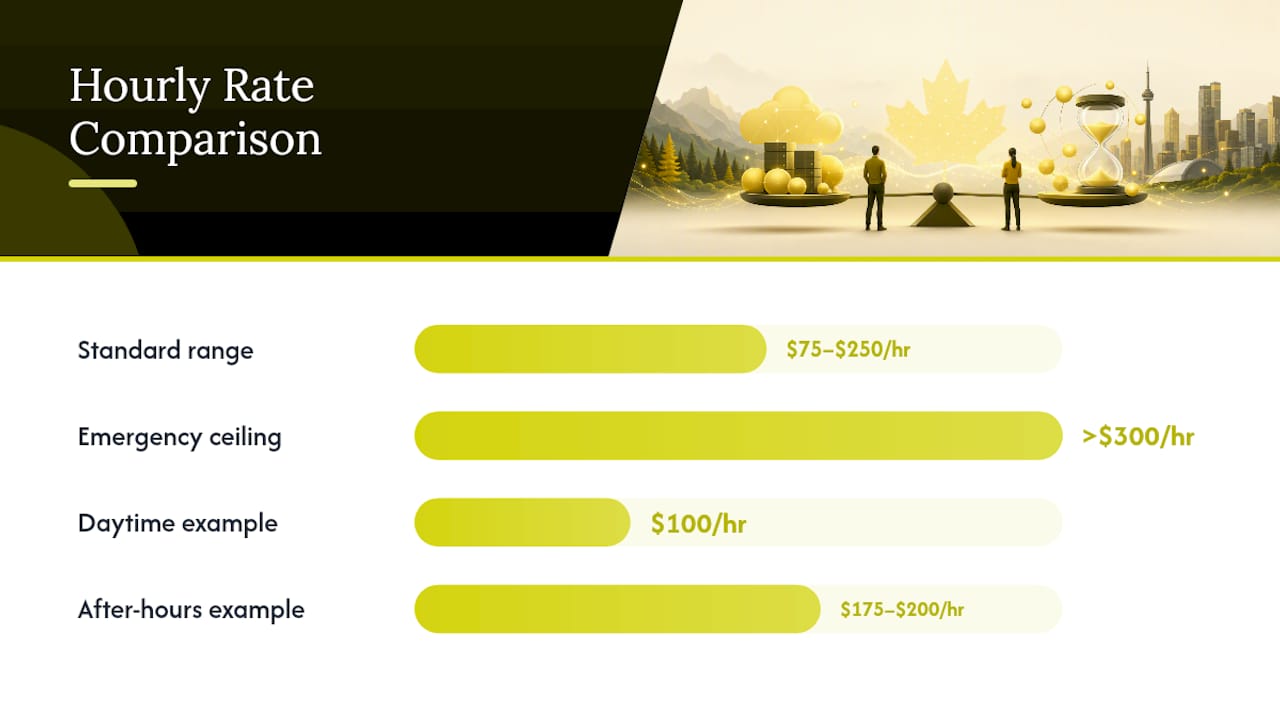
Expect to pay $75 to $250 per hour for ad-hoc IT support, with emergency calls climbing past $300. Managed, per-user pricing runs a different math problem entirely, usually landing between $100 and $250 per user per month once tooling is included. The fastest way to budget: multiply your realistic monthly support hours by the bill rate for the right skill tier, then add a buffer for tools and one bad month.
TL;DR:
- Hourly support rates for ad-hoc IT help range from $75 to $250 per hour, with emergency after-hours calls exceeding $300 depending on urgency and timing.
- Tier 1 help desk services cost between $58 and $84 per hour, while senior security and cloud specialists can charge up to $260 per hour, reflecting expertise levels.
- Managed, per-user support plans usually run $100 to $250 per user monthly, often proving more cost-effective for businesses with consistent or high support needs.
- Hourly billing can become costly after a major incident, as emergency rates often surpass traditional support prices, favoring fixed or managed plans for heavier or regulated businesses.
- When comparing bids, always clarify what is included in rates, whether additional fees apply, and avoid providers with vague or hidden costs to ensure accurate budgeting.
Table of Contents
- What Are Typical IT Support Hourly Rates for Break-Fix and Emergency Work?
- How Do Hourly Rates Change by Role and Skill Level?
- Which IT Support Pricing Model Actually Costs Less?
- How Do You Turn an Hourly Rate Into a Monthly IT Budget?
- Why Do IT Support Quotes Vary So Much Between Providers?
- What Questions Should You Ask Before Signing an Hourly IT Contract?
- When Hourly Support Makes Sense and When It Doesn’t
- Get a Clear IT Support Estimate Built Around Your Business
- Sources
- FAQ
What Are Typical IT Support Hourly Rates for Break-Fix and Emergency Work?
Break-fix and ad-hoc IT support typically runs $75 to $250 per hour, depending on the provider’s overhead, the technician’s skill level, and how urgently you need someone on the line. That band covers standard business-hours troubleshooting: password resets, network hiccups, printer failures, software conflicts, and the general fires that pop up in any office running on computers.
Emergency and after-hours work sits in a different category entirely. Providers typically apply a multiplier of 1.5 to 2 times the standard rate for nights, weekends, and holidays, and emergency rates can exceed $300 per hour when a server crashes at 2 a.m. or ransomware hits during a long weekend. A $100/hour daytime technician can easily become a $175 to $200/hour technician the moment the clock passes 6 p.m. on a Friday.
Remote and on-site billing also diverge in ways buyers frequently miss. Remote troubleshooting is usually billed from the moment a technician connects to your system, with no travel time added to the invoice. On-site visits typically include a minimum call charge, sometimes a trip fee, and often round up to the nearest half hour. A technician who spends 20 minutes fixing your printer might still bill you for a full hour once the drive time and minimum visit charge get added in.
Here’s how a typical incident breaks down on the invoice:
- Remote password reset and account lockout: 15 minutes at $90/hour, billed at the 15-minute minimum, roughly $22.50.
- Remote server troubleshooting during business hours: 2 hours at $120/hour equals $240.
- On-site network outage, standard hours: 3 hours at $110/hour plus a $50 trip fee equals $380.
- After-hours ransomware response: 4 hours at $220/hour (emergency multiplier applied) equals $880.
That last line item is exactly why so many businesses eventually shift toward managed plans with guaranteed response windows instead of paying premium rates every time something breaks at the worst possible moment.
How Do Hourly Rates Change by Role and Skill Level?
Not every IT problem needs the same level of expertise, and paying architect-level rates for a password reset is money wasted. The market prices skill tiers distinctly, and knowing where a task falls saves real money.
According to CRB Workforce’s 2026 MSP rate card, the spread looks like this:
- Tier 1 help desk (password resets, basic troubleshooting, ticket triage): $58 to $84/hour.
- Tier 2 help desk (escalated tickets, software configuration, deeper diagnostics): $72 to $105/hour.
- Field service or on-site technicians: often in the $55 to $95/hour range, similar to help desk pricing despite the travel component.
- Sysadmins and network engineers (servers, routing, infrastructure management): $100 to $150/hour.
- Cloud engineers and cloud architects (migrations, architecture design, multi-cloud environments): $175 to $260/hour.
- Security specialists and penetration testers: frequently priced above general IT rates given the specialized certifications and liability involved.
The decision to escalate from help desk to specialist usually comes down to three cues: the problem touches infrastructure rather than a single device, it involves regulated data, or a Tier 1 technician has already spent 30 minutes without resolution. Escalating too late costs more in downtime than the rate difference ever will.
Which IT Support Pricing Model Actually Costs Less?
The three dominant pricing models. Time and Materials (hourly), block hours or retainers, and managed per-user pricing, solve different problems, and picking the wrong one for your situation is where most businesses overspend.
- Time and Materials (hourly). You pay only for work performed, which suits businesses with unpredictable, infrequent IT needs. The downside: costs are unpredictable month to month, and there’s no incentive for the provider to prevent problems since they get paid regardless.
- Block hours or retainers. You pre-purchase a set number of hours monthly, often at a discount versus straight hourly rates. Unused hours sometimes roll over, sometimes don’t, so read the fine print before assuming you’re saving money.
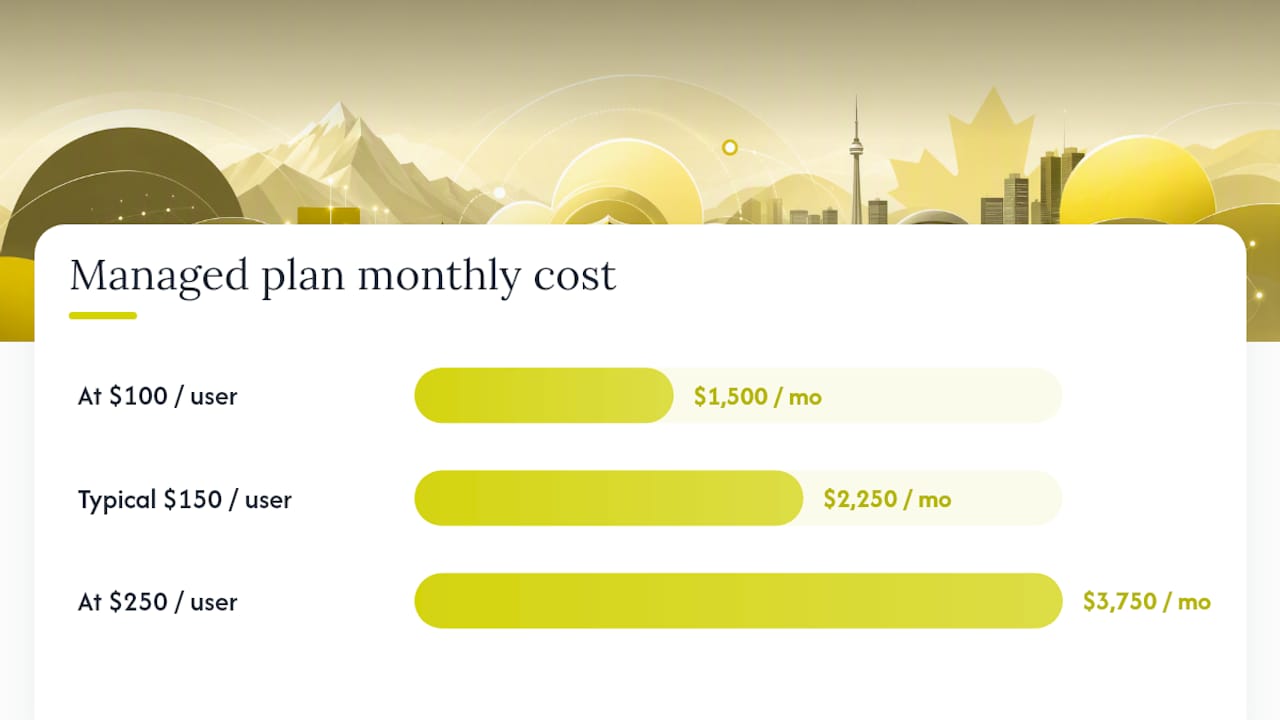
- Managed, per-user or per-device pricing. You pay a flat monthly fee covering unlimited support, monitoring, and typically security tooling. Managed IT services generally run $100 to $250 per user per month depending on scope.
Here’s the break-even math that matters: if you have 15 employees and pay $150 per user monthly under a managed plan, that’s $2,250 per month. At a $110/hour blended rate, that same budget buys roughly 20 hours of hourly support. If your business regularly needs more than 20 hours of combined help desk and infrastructure work each month, managed pricing usually wins on cost alone, before even factoring in the included security tooling that a T&M quote typically omits entirely.
Unlimited or all-you-can-eat plans make the most financial sense once your team’s support usage becomes consistent and predictable rather than sporadic.
How Do You Turn an Hourly Rate Into a Monthly IT Budget?
The formula is simple: monthly hours needed multiplied by the bill rate for the correct skill tier, plus tooling costs, plus a contingency buffer for the month something breaks badly.
A business using roughly 10 hours of Tier 1 and Tier 2 support monthly at a blended $95/hour rate spends about $950 on labor. Add $150 to $300 for endpoint protection, backup software, and monitoring tools, and the realistic monthly line item lands between $1,100 and $1,250.
Scale that up and the numbers shift fast:
- Light usage (10 hours/month): $950 labor + $200 tooling = roughly $1,150/month.
- Typical usage (25 hours/month): $2,375 labor + $350 tooling = roughly $2,725/month.
- Heavy usage with one major incident per year: add a one-time spike of $800 to $1,500 for the incident month, which is exactly the kind of cost a fixed monthly plan absorbs without a surprise invoice.
Before sending a request for proposal to any vendor, confirm four things: the hourly rate by role, whether tooling is billed separately, the after-hours multiplier, and whether there’s a minimum monthly commitment. Vendors who dodge any of those four questions are telling you something about how their invoices work.
Why Do IT Support Quotes Vary So Much Between Providers?
Two providers quoting wildly different hourly rates for the same job usually aren’t lying, they’re pricing different things. Certifications, compliance obligations, liability coverage, and response guarantees all stack onto the base labor cost.
- Technicians holding advanced security certifications or cloud platform credentials command noticeably higher rates than generalists, and that premium reflects real training investment, not markup for its own sake.
- Businesses in regulated industries requiring HIPAA or PCI-DSS compliance should expect providers to charge more, since compliance work carries audit trails, documentation requirements, and legal exposure that generalist support doesn’t.
- A guaranteed response SLA, especially one promising 24/7 coverage or a response window under an hour, costs the provider staffing money around the clock, and that shows up in your rate.
- Travel time, mileage, and specialized equipment are sometimes billed as line items separate from labor, so a low hourly rate on paper can still produce a high final invoice.
Pro Tip: Ask every vendor for their “all-in” hourly cost, meaning labor plus travel plus any mandatory tooling fee rolled into one number. A $95/hour quote that hides a $75 trip charge and a $40/month monitoring fee per device isn’t actually cheaper than a transparent $130/hour flat rate.
What Questions Should You Ask Before Signing an Hourly IT Contract?
Comparing hourly bids fairly means asking the same questions of every vendor and doing the math yourself instead of trusting the number on page one of the proposal.
- What exactly is included in the hourly labor rate? Ask whether remote monitoring, patching, and basic security tools are bundled or billed separately.
- What’s the after-hours and emergency policy? Get the exact multiplier in writing, not a vague “rates may increase.”
- Is there a response time SLA, and what happens if they miss it? No SLA at all is a genuine red flag for any business that can’t afford extended downtime.
- Are travel fees, minimum call charges, or tooling subscriptions billed on top of the hourly rate? This is where the pay rate versus bill rate gap widens fastest.
Negotiation leverage exists even in hourly contracts: ask for capped emergency rates, banked hours that roll over, or volume discounts once your monthly usage crosses a threshold. Vague scope of work, no SLA, and surprise add-on fees on the final invoice are the three clearest signs to walk away.
When Hourly Support Makes Sense and When It Doesn’t
Hourly, pay-per-ticket support fits a narrow but real use case: very small businesses with light, infrequent IT needs, or a one-off project like an office move or a single server migration. Paying for exactly what you use makes sense when your IT needs are genuinely unpredictable and rare.
Once a business grows past a handful of employees, or starts handling regulated client data, the math tends to flip. A single ransomware incident billed at emergency rates can cost more than a year of managed coverage, and hourly billing gives providers no financial incentive to prevent problems before they happen. Managed, cybersecurity-first plans with 24/7 monitoring and guaranteed response windows shift the incentive toward prevention instead of billable hours. That’s the entire argument for managed IT once your business has real data, real compliance exposure, or real downtime cost.
— 247techify Team
Get a Clear IT Support Estimate Built Around Your Business
Some IT providers price services transparently and matched to how much support your business actually needs. For occasional issues, Pay-Per-Ticket support runs a flat $79 per ticket, no surprise emergency multiplier, no trip fee negotiation. For businesses that have outgrown ad-hoc billing, the Business managed IT plan runs $1,099 to $2,499 CAD per month and bundles 24/7 support with an average response time under 30 minutes, backed by compliance expertise for regulated industries like healthcare and finance.
If you’re not sure which model fits your usage pattern, the fastest path is a direct comparison against your current invoices. Review current pricing or explore the full range of managed IT services to request a written estimate built around your actual hours, headcount, and compliance requirements.
Sources
Rate ranges in this guide draw from CRB Workforce’s 2026 MSP rate card for role-based bill rates, KORE1’s contractor pay data for the pay-versus-bill distinction, and SerenIT’s 2026 IT cost analysis for managed pricing and budgeting figures. Regional pay data referenced ZipRecruiter’s Vancouver listings.
- 2026 MSP Rate Card: IT Staffing Bill Rates by Role — CRB Workforce
- Tech Contractor Hourly Rates in 2026 — KORE1
- IT Support Cost | What Businesses Actually Pay in 2026 | SerenIT
FAQ
How Much Should You Charge or Expect to Pay for IT Support?
Ad-hoc IT support typically runs $75 to $250 per hour, depending on skill tier and urgency. Emergency or after-hours work can push past $300 per hour once multipliers apply.
What Is a Typical Hourly Rate for an IT Person?
It depends heavily on role: Tier 1 help desk runs $58 to $84 per hour, while cloud architects and senior security specialists bill $175 to $260 per hour or more. The technician’s actual pay is usually far lower than the bill rate, since invoices cover overhead, insurance, and tooling on top of wages.
How Much Do Most IT Support Jobs Pay the Technician?
Technician pay and client bill rates are two different numbers. IT support contractors are typically paid $35 to $55 per hour, while the agency or MSP bills clients $50 to $80 per hour or higher for that same work.
What’s a Good Freelance IT Support Rate Compared to an MSP?
A freelance technician’s rate often sits close to the pay-rate end of the scale, roughly $50 to $90 per hour, since they carry less overhead than a full MSP. An MSP charges more per hour but typically bundles monitoring, security tooling, and guaranteed response times that a solo freelancer usually cannot offer.
Is Hourly or Managed IT Support Cheaper for a Small Business?
It depends on usage. Businesses needing fewer than 15 to 20 hours of support monthly often do fine on hourly billing, while heavier or security-sensitive usage typically costs less under a managed per-user plan once tooling and incident risk are factored in.