
Endpoint protection cuts breach risk, shortens detection and response time, keeps operations running through an attack attempt, and gives regulated businesses the audit trail compliance frameworks demand. The verdict: if you have no dedicated IT security staff, a managed endpoint protection service beats a self-managed EPP/EDR license every time, because detection tools without a human response plan just generate alerts nobody reads. Your next step takes fifteen minutes:
- Inventory every laptop, server, and mobile device that touches business data
- Check whether your current antivirus includes behavioral detection and remote remediation, or if it is signature-based and years out of date
- Schedule a 30-minute call with a managed IT provider to run a basic endpoint risk check before you sign anything
Key Takeaways
Endpoint protection lowers breach risk, shortens detection and response time, and keeps a business running through an attack attempt, but only when paired with a response model someone can actually maintain.
| Point | Details |
|---|---|
| EDR beats basic antivirus | Behavioral detection catches attacker techniques signature-based tools miss entirely. |
| Alert volume without response is a liability | A tool nobody can triage creates false confidence, not real protection. |
| Deployment takes 4 weeks to full benefit | Planning, pilot, rollout, and tuning stages precede noticeable results. |
| Managed service fits most SMBs | Businesses without dedicated security staff need 24/7 human verification, not just software. |
| 247techify offers managed endpoint protection | Behavioral detection paired with guaranteed response windows and built-in compliance reporting. |
Table of Contents
- What Are the Business Benefits of Endpoint Protection for Small Business?
- What Does Endpoint Protection Actually Include?
- Which Endpoint Security Features Should Small Businesses Require?
- How Does Endpoint Protection Actually Prevent Business Damage?
- What Does Endpoint Protection Cost and How Long Does Deployment Take?
- How Should a Small Business Choose an Endpoint Protection Provider?
- Why Small Businesses Are Choosing Managed Endpoint Protection
- Sources
- FAQ
What Are the Business Benefits of Endpoint Protection for Small Business?
Endpoint protection is not a line item you buy to check a compliance box. It changes five concrete things about how your business operates day to day, and each one has a dollar figure attached.
Reduced breach risk. Endpoints, laptops, desktops, phones, servers, are the most common entry point attackers use to get into a network. A retail business running outdated antivirus on point-of-sale terminals is an easier target than one running behavioral detection that flags unusual process activity before a script can execute.
Faster detection and response. The gap between “malware lands on a device” and “someone notices” is where damage compounds. Modern endpoint tools cut that gap from days to minutes by watching behavior in real time instead of waiting for a signature match.
Operational continuity. A ransomware event that locks three workstations is an inconvenience. One that locks your entire file server for four days is a business crisis. Isolation features contain an infected device automatically, so one bad click doesn’t become a company-wide shutdown.

Compliance support. Healthcare, finance, legal, and real estate businesses face specific data-handling obligations. Endpoint logging and reporting give you the audit trail regulators and cyber insurers ask for after the fact.
Lower recovery costs. Recovery from a breach, forensic work, legal notification, downtime, customer churn, costs far more than prevention. IBM’s endpoint security research puts the average cost of a data breach at $4.44 million globally, and notes that endpoints account for a large share of successful attacks.
A 12-employee accounting firm we’ve seen in this space had behavioral detection flag an unfamiliar PowerShell process spawning from a spreadsheet macro, minutes after it opened. The endpoint agent isolated the device automatically. Nobody in the office noticed anything happened until IT called to confirm it was handled. That’s the entire point: the incident that never becomes a story.
That’s the difference between endpoint security for SMBs done right and antivirus software from 2015 still running on autopilot.
What Does Endpoint Protection Actually Include?
“Endpoint protection” gets used as a catch-all term, and that vagueness is exactly what lets weak products hide behind strong marketing. There are three distinct layers, and knowing which one you’re buying matters more than any feature list.
EPP (Endpoint Protection Platform) is prevention. It blocks known malware, enforces device policies, and stops threats before they execute. Think of it as the locked front door.
EDR (Endpoint Detection and Response) is detection and response. It watches for behavior that looks wrong even when no known malware signature matches, then gives you (or your provider) the tools to investigate and contain it. This is the security camera and the alarm system combined.
XDR (Extended Detection and Response) correlates signals across endpoints, email, network, and cloud apps into one picture, catching multi-stage attacks that would look harmless if you only examined one layer.
Microsoft’s endpoint security framework describes this as a flow: prevention stops the obvious threats at the door, detection catches what slips past, and response contains and remediates what detection finds. Skip any one stage and you have a gap.
For most small businesses, EDR is the practical floor, not EPP alone and not full XDR. Antivirus by itself is no longer sufficient against modern attack techniques, but XDR’s cross-layer correlation often assumes a security team large enough to act on the extra visibility. A small business without dedicated staff usually gets more real protection from EDR paired with managed response than from an XDR platform nobody has time to tune.
- EPP: prevention, blocks known threats, policy enforcement
- EDR: behavioral detection, investigation tools, remediation actions
- XDR: cross-layer correlation, best suited to larger security teams
Which Endpoint Security Features Should Small Businesses Require?
Vendor feature lists run long on purpose. Most of what’s listed doesn’t matter for a ten-person business. Sort by what you actually need first.
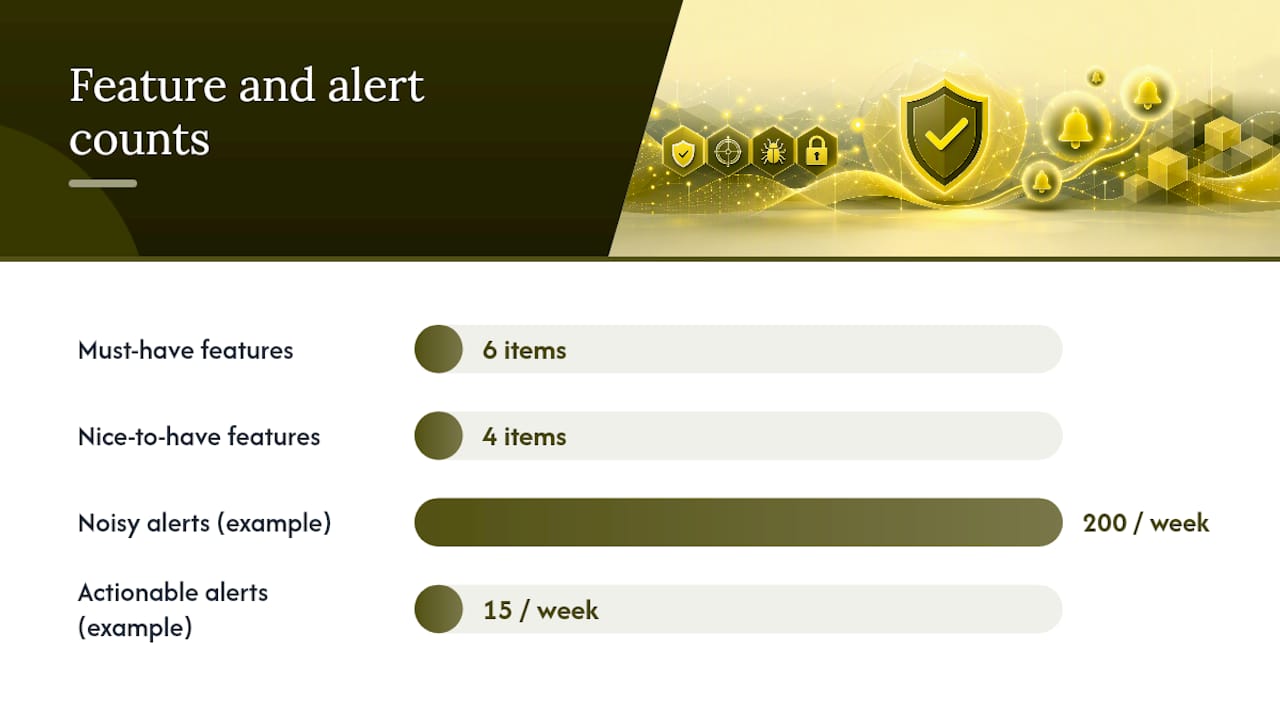
Must-haves:
- Behavioral detection that catches attacker techniques using legitimate admin tools like PowerShell or WMI, not just known malware signatures
- Full telemetry and visibility into what’s happening on each device, not a black-box “clean/infected” status
- Isolation and remediation that can quarantine a compromised device without someone driving to the office
- Centralized, cloud-based management so one person can see every endpoint from one dashboard
- Patch management that closes vulnerabilities automatically instead of relying on employees to click “update later” forever
- Deployment simple enough that a small IT team, or no IT team, can roll it out without a consulting engagement
Nice-to-haves:
- Automated rollback that reverts a device to its pre-infection state
- Integrated data loss prevention (DLP), tools like the alternatives covered in this comparison of DLP options show how this category has evolved beyond basic content scanning
- XDR integrations for businesses expecting to scale their security operation
- Email and web filtering bundled into the same console
Behavioral detection matters more than most buyers realize because attackers increasingly use “living off the land” techniques, legitimate system tools repurposed for malicious ends, that signature-based scanning simply misses.
Pro Tip: During any trial period, count how many alerts the tool generates in a week and ask who is actually reading them. A platform that produces 200 alerts a week with no triage process is worse than one that produces 15 you can act on. Alert volume without a response plan behind it is a liability, not a feature.
How Does Endpoint Protection Actually Prevent Business Damage?
Features only matter if they change the outcome of an actual incident. Here’s the cause-and-effect chain that turns a checklist item into avoided downtime.
- Faster telemetry collection leads to earlier detection, which shrinks the blast radius before an attacker moves laterally to other devices
- Behavioral analysis of process relationships catches attacks that never trigger a signature match, closing the gap that traditional antivirus leaves wide open
- Automated isolation contains a compromised device in seconds instead of waiting for a human to notice something is wrong
- Centralized cloud management means a security update or policy change reaches every device at once, instead of trickling out over weeks
Cloud-delivered platforms carry a specific advantage for small businesses: threat intelligence updates arrive faster than an on-premises system syncing on a fixed schedule, infrastructure overhead drops because there’s no server to maintain, and remote or hybrid teams get the same protection whether they’re in the office or working from a kitchen table. Microsoft notes that the traditional network perimeter has effectively dissolved as remote work persists, which makes cloud delivery less of a convenience and more of a requirement.
A typical incident timeline with modern EDR looks like this: detection within minutes of anomalous behavior, containment through automated isolation shortly after, and remediation, cleaning the device and confirming no lateral movement, within hours rather than the days or weeks a manual investigation would take. Compare that to the $4.44 million average breach cost IBM tracks globally, and the value of shrinking that window becomes obvious.
What Does Endpoint Protection Cost and How Long Does Deployment Take?
Pricing depends less on the brand name and more on structure. Understanding the drivers helps you compare quotes that otherwise look wildly different for no clear reason.
Cost drivers:
- Per-device versus per-user licensing (per-device usually costs more if employees use multiple machines)
- Managed versus self-managed: a managed service bundles monitoring and response into the price; self-managed tools require you to staff that function yourself
- Feature tiers: basic prevention costs less than full EDR with 24/7 monitoring
- Integrations and support SLAs: guaranteed response times cost more than best-effort support
Deployment timeline:
| Stage | What Happens | Typical Duration |
|---|---|---|
| Planning | Endpoint inventory, policy design, vendor selection | 1–2 weeks |
| Pilot | Deploy to a small device group, test for conflicts | 1 week |
| Full rollout | Deploy across all endpoints | 1–2 weeks |
| Tuning | Adjust detection sensitivity, reduce false positives | 2–4 weeks |
| Noticeable benefit | Fewer false alarms, faster confirmed detections | 4 weeks in |
A simple ROI case: a managed endpoint plan running $30 to $60 per device monthly is a rounding error next to even a partial breach recovery. If it prevents one ransomware event that would otherwise cost days of downtime plus recovery labor, the annual license fee pays for itself several times over. Protecting business data isn’t the expensive part; recovering it after the fact is.
How Should a Small Business Choose an Endpoint Protection Provider?
Run the evaluation like a hiring decision, not a shopping trip. The wrong vendor costs you more in wasted time than a slightly higher price tag ever would.
Evaluation checklist:
- Does it fit your actual internal resources, or does it assume a security team you don’t have?
- Does it give you real visibility into device activity, not just a pass/fail status?
- Who responds when something fires, a human on the vendor’s side, or only you?
- Does it integrate with your existing Microsoft 365 or cloud environment without extra middleware?
- Is pricing predictable per device or per user, with no surprise tiers added later?
Questions to ask on a demo call:
- What’s your typical false positive rate, and how do you tune it down over the first month?
- Who investigates an alert before it reaches me, a machine or a person?
- What’s your guaranteed response time once a threat is confirmed?
- What remediation actions can you take remotely without my involvement?
- What happens to my data and configuration if I switch providers later?
Red flags: alert volumes nobody can realistically triage, vague answers about who owns incident response, contracts that lock you into proprietary agents you can’t export data from, and tuning requirements that assume a full-time security analyst on staff.
Why Small Businesses Are Choosing Managed Endpoint Protection
Detection tools without a maintainable response model just produce noise nobody has time to read, which is exactly the gap most self-managed small business deployments fall into. A managed endpoint protection service closes it with 24/7 monitoring, human verification of alerts before they hit your inbox, and remediation that happens whether it’s 2 p.m. or 2 a.m.
Managed scope typically covers continuous monitoring, patch management, incident response, monthly reporting, and compliance documentation for regulated industries. The value isn’t the software, it’s the person on the other end who confirms an alert is real before waking you up over a false positive.
- 24/7 monitoring with defined response time SLAs
- Human triage that filters real threats from noise
- Patch management handled without employee involvement
- Compliance reporting formatted for auditors, not just IT
What 247Techify’s Team Has Learned From Small Business Deployments
The most common mistake we see isn’t picking the wrong software, it’s picking software nobody on staff can maintain. A powerful EDR platform with no one watching the console is functionally worse than basic prevention, because it creates a false sense of coverage. The businesses that hold up under real attacks are the ones treating endpoint protection as an ongoing operational function, not a one-time purchase.
Managed Endpoint Protection Built for Businesses Without a Security Team
If your business doesn’t have someone watching endpoint alerts around the clock, that’s precisely the gap 247Techify’s managed endpoint protection closes. Our approach pairs behavioral detection with a human response team that verifies threats and acts within a guaranteed response window, so a flagged device gets contained in minutes, not whenever someone happens to check a dashboard. Clients in regulated industries also get the compliance documentation HIPAA and PCI-DSS audits require, built into monthly reporting rather than assembled after the fact.

For businesses running compliance-heavy operations, our IT compliance and auditing services pair directly with endpoint monitoring to keep audit trails current. If you want a straight answer on where your current setup stands, request a managed IT services security check and we’ll tell you exactly what’s covered and what isn’t, no obligation attached.
Sources
- What Is Endpoint Security? | Microsoft Security
- What is endpoint security? | IBM
- Best Endpoint Protection for Small Businesses in 2026 | Huntress
- Best Endpoint Protection for Small Business: Antivirus vs EDR vs MDR - CTG Tech
- New guidance from OSFI on technology and cybersecurity incident reporting | Osler
FAQ
What Is the Best Endpoint Protection Software for Small Businesses?
There’s no single best product for every business, but the strongest fit for most small businesses is EDR paired with managed response, since prevention alone misses behavioral attacks and unmanaged EDR often generates more alerts than a small team can handle.
Is an Endpoint Protection Service Necessary?
Yes, given that endpoints are among the most common entry points for successful attacks, and basic antivirus alone no longer catches behavioral techniques like living-off-the-land attacks.
What Are Examples of Endpoint Protection?
Examples include EPP platforms for prevention and policy enforcement, EDR tools for behavioral detection and remediation, and managed detection and response (MDR) services that add a human team to verify and act on alerts, an approach 247techify provides for businesses without in-house security staff.
What Are the Benefits of EDR Security?
EDR catches threats that bypass signature-based antivirus by monitoring behavior in real time, gives investigators full visibility into what happened on a device, and enables remote isolation and remediation before an incident spreads to other systems.