
A business continuity plan for IT must guarantee that critical services meet defined recovery targets, RTO, RPO, and MTD, and prove it through testing rather than assumption. This guide walks the full lifecycle: business impact analysis, core plan components, runbook development, testing cadence, common disruptors like ransomware, and vendor continuity verification, grounded in Canadian Centre for Cyber Security guidance and practical templates from 247techify.
TL;DR:
- Regular testing, including tabletop exercises and failover drills, is essential to prove that recovery procedures work and keep plans current.
- Clear ownership with designated leads and deputies prevents plan failures caused by untested steps, outdated contacts, or inaccessible personnel during crises.
- Response to specific disruptors like ransomware or cloud outages requires tailored sequences, such as forensics preservation or assessing support for automated failover.
- Vendor continuity must be verified through documented test results, incident SLAs, and contingency plans involving manual workarounds or secondary suppliers.
- Plans should remain concise, well-tested, and backed by documented evidence rather than lengthy documents or outdated assumptions.
Table of Contents
- What Is Business Impact Analysis (BIA) in an IT BCP?
- What Should an IT Business Continuity Plan Include?
- Who Owns Recovery, and How Do You Build a Runbook That Works?
- How Often Should You Test a Business Continuity Plan?
- How Do You Prioritize Ransomware, Cloud Outages, and Other IT Disruptors?
- How Do You Verify Vendor and Supply-Chain Continuity?
- Where to Find IT Continuity Templates and Practical Recovery Playbooks
- What the Industry Gets Wrong About IT Continuity Planning
- Get Help Building and Testing Your IT Continuity Plan
- Sources
- FAQ
What Is Business Impact Analysis (BIA) in an IT BCP?
A business impact analysis is the exercise that turns vague continuity goals into numbers your IT team can actually build around. Skip it, and your recovery time objectives become guesses, usually wrong ones, made under pressure during an actual outage.
The method is straightforward, even if the conversations behind it are not. Start with a full inventory of business processes, then score each one by financial, operational, and reputational impact if it stops. From there, business owners, not IT staff, assign a maximum tolerable period of disruption (MTPD) for each process. That single number drives everything downstream: your recovery time objective (RTO, how fast a system must come back) and recovery point objective (RPO, how much data loss is acceptable) both derive from it.
The technical mapping step is where most plans fall apart. A “critical” order-processing workflow might depend on a database server, a payment gateway API, and a specific VPN tunnel; if any one of those has a longer recovery time than the business tolerance allows, the whole process misses its target regardless of how well the other pieces perform. This is also where allocating RTO and RPO by application rather than by infrastructure tier pays off, especially for regulated firms juggling multiple compliance clocks.
Document the output as a tier table, not a narrative:
- Service, business owner, MTPD, RTO, RPO as columns, one row per critical process.
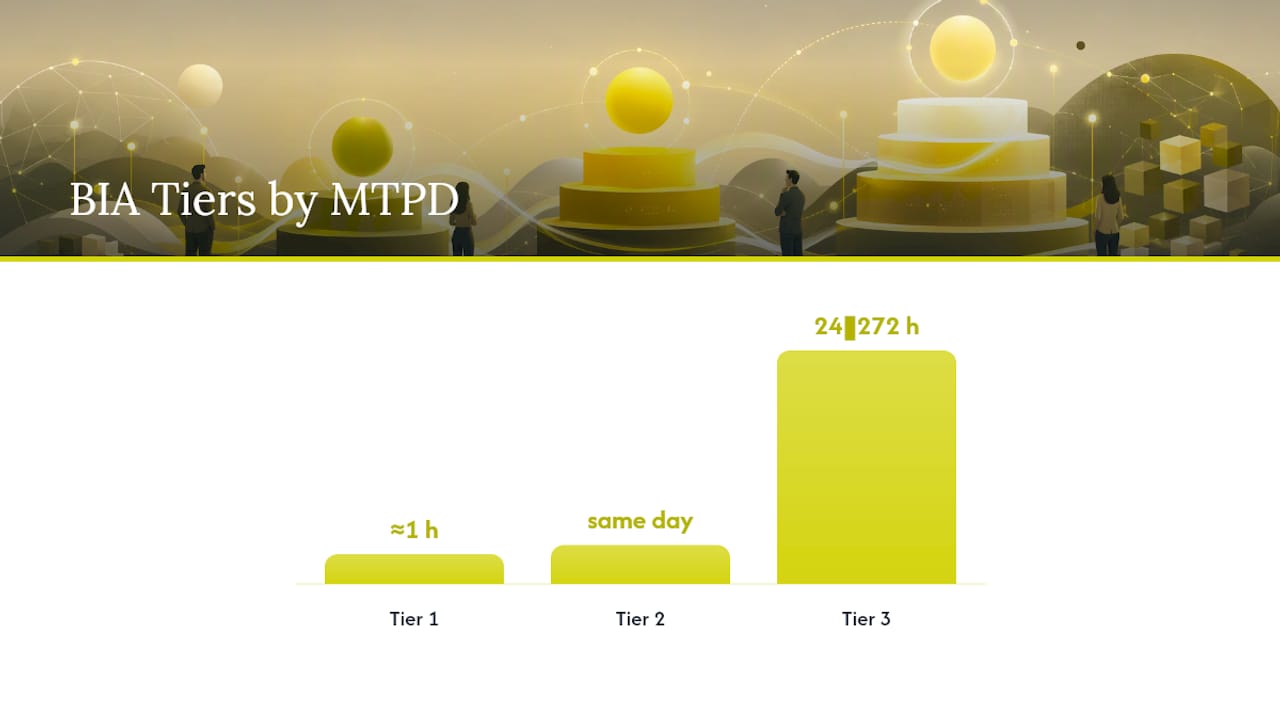
- Tier 1 (minutes to low hours), Tier 2 (same business day), Tier 3 (24 to 72 hours) as rough groupings.
- Sign-off from each business owner, dated, kept with the plan.
Refresh the BIA annually, or immediately after any major system change, acquisition, or new regulatory obligation. A BIA from two product launches ago is not a BIA. It is an artifact.
What Should an IT Business Continuity Plan Include?
An operational IT BCP has seven components that matter to recovery, not seven sections that matter to auditors. Purpose and scope, roles and escalation authority, the BIA-derived recovery tiers, communication protocols, technical runbooks, backup and DR procedures, and vendor continuity requirements. Each one answers a question someone will ask mid-incident: who decides, what do we do, who do we tell, and how do we know it worked.
Structure matters as much as content. The best format keeps the working body short and action-oriented, then pushes anything that changes often, contact lists, vendor account numbers, credential vault locations, into appendices you can update without touching the core plan. Agility Recovery’s template guidance recommends 15 to 25 pages for a small or midsize organization’s core plan, and that ceiling exists for a reason: a 90-page document nobody reads under stress is worse than no document at all. Anything past that length belongs in an appendix or a linked runbook.
Inside each runbook, spell out:
- The trigger condition that activates it (a specific alert, an outage duration, a confirmed breach).
- The exact sequence of steps, including who executes each one.
- Dependencies that must be checked first, like backup integrity, before the next step runs.
- A rollback or escalation path if the primary step fails.
Skip the temptation to write a plan that reads well in a boardroom. Write one that a tired on-call engineer can execute at 3 a.m. without calling three other people to interpret it.
Who Owns Recovery, and How Do You Build a Runbook That Works?
Ownership gaps kill continuity plans faster than technology failures do. Every recovery team needs a named lead, a named deputy, and a clear line of succession, because the person who wrote the runbook is statistically the person most likely to be unreachable when it’s needed. Agility Recovery’s analysis of plan failures points to the same pattern repeatedly: untested steps, outdated contact numbers, and unclear ownership, not exotic technical failures, are what actually break continuity in practice.
A runbook that works reads like a checklist an unfamiliar engineer could follow cold. Build it in this order:
- State the precondition. What must be confirmed true before step one begins (backups verified clean, affected systems isolated, stakeholders notified)?
- Sequence the actions. Number every step; note which ones can run in parallel and which must run in strict order.
- Flag safety and forensic checkpoints. For any cyber incident, insert a preservation step before remediation, don’t wipe evidence chasing speed.
- Define done. State the measurable condition that proves the step succeeded, not just that it was attempted.
- Name the escalation path. If a step fails or exceeds its time budget, who gets called next?
Activation thresholds need the same precision. “A major outage” is not a threshold. “Core ERP unavailable for more than 15 minutes, or any confirmed unauthorized access to production data” is. Someone with declared authority, usually the IT director or a designated incident commander, makes the call to activate, and that authority should be written into the plan by title, with at least one backup name.
Pro Tip: Never mark a runbook “validated” based on a walkthrough alone. Require evidence, a screenshot, a log excerpt, a timestamped test result, before you sign off on it as change-controlled and current.
How Often Should You Test a Business Continuity Plan?
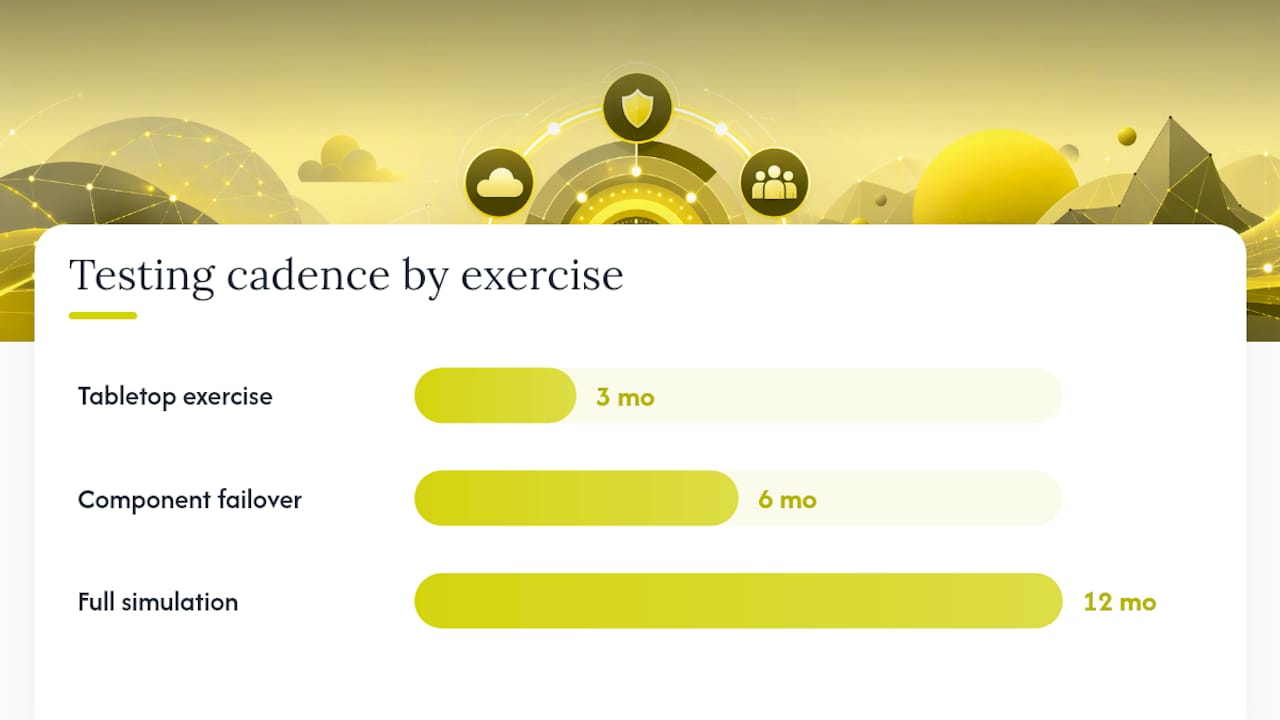
Test on a ladder, not a single annual checkbox. Tabletop exercises quarterly, where the team talks through a scenario step by step without touching production. Component failover tests semiannually, actually flipping a database or network path to its backup path. A full simulation or live failover annually, or immediately after any major infrastructure change, acquisition, or platform migration.
Each rung on that ladder validates something different:
- Tabletops surface gaps in communication chains and decision authority before anything technical is at risk.
- Component failover tests confirm backup integrity and malware-free restores, the difference between a backup that exists and one that actually works.
- Full simulations expose the compounding failures that only appear when several systems fail at once.
Gartner’s guidance on stress-testing business continuity programs reinforces aligning test scope with actual business risk appetite rather than testing whatever is easiest to schedule.
Document every exercise with an after-action review, an evidence log tied to each tested step, and a closure date for every finding. A useful working rule: treat any recovery step that has not been demonstrated successfully in the past 12 months as unproven, not as validated on the strength of last year’s test. Plans age. Testing is the only thing that keeps the expiration date from creeping up on you unnoticed.
How Do You Prioritize Ransomware, Cloud Outages, and Other IT Disruptors?
Different disruptors demand different response sequences, and applying a generic recovery process to all of them wastes time you don’t have. Ransomware requires forensic preservation before anything else. Restoring from backup before confirming the malware isn’t hiding in that backup image just re-infects production, so validate images and scan them clean first, which extends timelines well beyond a standard hardware failure. Cloud provider outages call for a different decision: does your architecture support automatic failover, or do you accept degraded operation until the provider recovers? Data corruption behaves differently than hardware failure too, since corruption can silently propagate into backups before anyone notices, demanding tighter RPO windows and integrity checks that pure hardware-failure recovery doesn’t need.
In the first 24 to 72 hours of any major incident, QuickBooks’ operational guidance recommends securing facilities and notifying affected employees and clients before attempting full technical or financial recovery. That sequencing, contain and communicate before you fully restore, applies just as directly to a ransomware event as it does to a physical disruption, and it’s a step IT-focused plans sometimes skip in the rush to rebuild systems. Reviewing how security incident response actually works alongside your continuity runbooks closes that gap.
How Do You Verify Vendor and Supply-Chain Continuity?
Your continuity plan is only as strong as the weakest vendor it depends on, and most organizations never ask the vendor to prove otherwise. Before you trust a supplier with a critical process, get evidence, not assurances: their own test results, their recovery site locations, a defined incident notification SLA, and a documented process for extracting your data if the relationship ends.
Contract language should require:
- Incident notification within a specific window, hours, not “as soon as possible.”
- A stated uptime SLA with defined remedies if it’s missed.
- Explicit disaster support obligations, not just standard support terms.
- Audit rights so you can verify their continuity claims rather than take them on faith.
When a vendor does fail despite all that, you need a fallback that doesn’t depend on them fixing it fast: a manual workaround, a pre-vetted alternate supplier, or a secondary connectivity path through a partner like Vadacom for telecom redundancy. The DATASEC vendor continuity framework also flags a design mistake worth checking now: redundant systems that quietly share a single power feed, fiber path, or admin credential set aren’t actually redundant. Feed every vendor dependency back into your BIA and reference it directly in the relevant runbook, so a vendor failure triggers a known procedure instead of an improvised one.
Where to Find IT Continuity Templates and Practical Recovery Playbooks
Most IT teams don’t fail continuity planning because they lack knowledge. They fail because nobody has time to build a runbook from a blank page while also running daily operations. That’s the gap 247Techify’s resources are built to close.
- The Cloud Backup & Disaster Recovery service page outlines backup and restore architecture you can map directly against your BIA’s RTO and RPO targets.
- The audit-ready incident response one-pager gives you a starting document for the cyber-incident runbook your BCP needs but rarely has.
- Guidance on disaster recovery testing covers evidence capture that satisfies the exact procurement and compliance requirements regulated clients increasingly demand.
A managed engagement typically closes the vendor-evidence and testing gaps that internal teams flag every year but never get around to fixing.
What the Industry Gets Wrong About IT Continuity Planning
Most continuity advice treats the written plan as the deliverable. It isn’t. The plan is a hypothesis, and testing is the only thing that turns it into a fact. Plenty of organizations have a polished 60-page BCP sitting in a shared drive that has never once been exercised against a real failure, and that document provides false confidence, which is worse than no document at all.
The bigger blind spot is ownership of the BIA. Technical teams routinely guess at RTO and RPO because getting a business owner to commit to a real MTPD number is an uncomfortable conversation. That guess becomes the foundation for every recovery target downstream, and a foundation built on a guess doesn’t get sturdier just because the runbooks on top of it look thorough.
If you take one thing from this guide, prioritize the evidence trail over the document’s polish. A three-page runbook with a dated test log and a business owner’s signature beats a comprehensive plan nobody has touched since it was written. Regulated clients increasingly ask for that evidence during procurement, not the plan itself, which tells you where the real value sits.
— 247techify Team
Get Help Building and Testing Your IT Continuity Plan
Writing a business continuity plan is one project. Testing it quarterly, keeping vendor evidence current, and having someone answer at 2 a.m. when a runbook actually needs to run is a different commitment entirely, and it’s the one most internal IT teams struggle to sustain alongside daily work. A cybersecurity-first managed IT approach covers both: 24/7 support with rapid response times, plus the DR testing and vendor coordination that keep a plan from going stale.

A practical next step looks like a discovery engagement to map your current BIA gaps, followed by a managed backup and disaster recovery setup that gets tested on the cadence this guide describes, not once a year by accident. If you already know your infrastructure needs support beyond planning, Business managed IT plans start at 1,099 to 2,499 CAD per month depending on scope. For a first look at what fits your organization, check current pricing and plan details and get a gap assessment scheduled.
Sources
- Developing your business continuity plan (ITSAP.10.005)
- Business Continuity Plan Template for Small Business | Agility Recovery
- Business continuity plan: Recover from emergencies faster | QuickBooks
- Business Continuity Plan vs Disaster Recovery Plan: Key Differences
FAQ
What Is an IT Business Continuity Plan (BCP)?
An IT business continuity plan is a documented set of procedures that keeps critical technology services running, or gets them back within an agreed time, during a disruption. It ties recovery targets like RTO and RPO to business tolerance and follows a lifecycle of analysis, development, and regular testing.
What Are the Five Components of a Business Continuity Plan?
The core components are business impact analysis, roles and escalation authority, communication protocols, recovery runbooks with backup and DR procedures, and vendor continuity requirements. Each component answers a specific question that comes up during an actual incident: who decides, what happens next, and who gets notified.
What Is BCP for IT Specifically?
IT-focused BCP concentrates on the technical systems, applications, and data that support business processes, distinct from a broader organizational BCP covering facilities and staffing. It works alongside a disaster recovery plan, since a BCP and DRP are related but distinct, with the BCP setting the business tolerance and the DRP executing the technical restoration
What Is an Example of a Business Continuity Plan?
A working example includes a tier table of critical services with assigned RTO and RPO values, named recovery leads and deputies, activation thresholds tied to specific incident conditions, and appendices listing vendor contacts and credential vault locations. Small and midsize organizations generally keep the working body to 15 to 25 pages, pushing volatile details into appendices that get updated separately.
How Is Business Continuity Different From Disaster Recovery?
Business continuity covers the full organization, including people and processes, while disaster recovery focuses narrowly on restoring IT systems and data. The two must integrate closely, since a BCP’s recovery targets are meaningless if the underlying DR procedures can’t meet them under test conditions.