
Start with an agent-first approach for tier-0 and routine tier-1 work, run a 4–8 week pilot on your three highest-volume request categories, then scale with strict governance controls in place. Measure Mean Time to Resolution (MTTR), ticket deflection rate, and SLA compliance from day one — those three signals will tell you whether your pilot is working before you commit to a broader rollout.
Three immediate priorities before your pilot goes live:
- Connect your identity provider (Active Directory, Azure AD, or Okta) and your PSA or ticketing system so the AI has real request data to classify and act on.
- Define success metrics upfront: target a 30–40% reduction in tier-1 ticket volume and a measurable MTTR improvement within the first 60 days.
- Set hard escalation thresholds so that any request involving privileged accounts, production systems, or sensitive data routes to a human agent rather than executing autonomously.
Pro Tip: Before the pilot launches, configure approval gates for every autonomous action the AI can take. A change that requires a human sign-off before execution is not a bottleneck — it is your primary safety control against runaway automation during the learning phase.
Key Takeaways
AI for IT support delivers measurable MTTR reduction and ticket deflection when deployed with correct integrations, a current knowledge base, and strict governance controls from the first day of the pilot.
| Point | Details |
|---|---|
| Pilot scope and timeline | Run a 4–8 week pilot on your three highest-volume tier-1 categories before expanding AI automation. |
| Primary metrics to track | Measure ticket deflection rate, MTTR, and cost per ticket against a 90-day baseline from the start. |
| Governance is a security control | Treat AI agent service accounts as privileged users: least privilege, approval gates, and immutable audit logs are required. |
| Integration depth determines success | Pre-built connectors to your PSA, IAM, and RMM tools matter more than model sophistication in production. |
| 247techify managed option | 247techify provides a cybersecurity-first, compliance-aware managed AI support deployment for teams that need production readiness without building the governance layer internally. |
Table of Contents
- How AI is used across the service desk today
- What core capabilities should you prioritize when evaluating AI?
- What benefits and metrics should you track?
- How do you choose the right AI vendor or MSP?
- How do you roll out AI for IT support without disrupting operations?
- What security, privacy, and compliance controls does AI in support require?
- What does current research say about the agentic AI shift?
- Pricing, ROI, and total cost of ownership
- Integration challenges with legacy ITSM tools and systems
- The case for treating AI governance as a security problem, not a feature
- 247techify’s AI-enabled managed IT support is built for security-first teams
- Sources
- FAQ
How AI is used across the service desk today
AI in IT support has shifted from a reactive, ticket-based workflow to a proactive, agentic model that classifies intent, attempts safe autonomous resolutions, and escalates to human agents with full context when it cannot resolve the issue. That shift is the single most important operational change in service-desk management in the past three years.
Triage and intent classification
Every inbound request, whether it arrives via email, portal, Teams, or Slack, is classified by intent before a human sees it. The AI reads the ticket text, extracts the request category (password reset, software access, VPN issue), assigns a confidence score, and routes it to the correct queue or attempts resolution directly. Misclassification rates drop significantly when the model is trained on your own historical ticket data rather than generic corpora.
Virtual agents and tier-1 deflection
AI service desks can route, deflect, or resolve common requests — password resets, access requests, basic troubleshooting — and surface runbooks inline to users and agents across channels including Microsoft Teams, Slack, web portals, and email. A well-configured virtual agent handles these conversations without any engineer involvement, freeing your team for work that actually requires judgment.
Agent assist and context enrichment
When a ticket does reach a human agent, AI surfaces the three most relevant knowledge articles, the user’s recent ticket history, and a suggested resolution before the agent types a single word. Summarization features compress long email threads into a two-sentence brief. That context enrichment alone can cut average handle time by a material margin on complex tickets.
Autonomous agentic execution
The most operationally significant capability is autonomous action: the AI executes a safe, pre-approved operation — unlocking an account, provisioning a software license, resetting a VPN credential — without human intervention, then logs every step. Vendor platforms demonstrate this by integrating with directory services, endpoint management tools, and ticketing systems while maintaining an audit trail for every action taken. The governance rule is straightforward: autonomous execution is permitted only for actions that are reversible, low-risk, and explicitly pre-approved by your team.

Pro Tip: Restrict autonomous execution to a whitelist of specific actions during the pilot. Expand that whitelist only after reviewing audit logs for at least two full weeks of production traffic.
Vendor-reported figures suggest that chatbot and self-service approaches built on an organization’s internal knowledge can deflect 40–60% of tier-1 tickets in deployments where runbooks and escalation thresholds are well defined. Treat that range as an aspirational ceiling, not a guaranteed baseline — actual deflection depends heavily on knowledge base quality and integration depth.
What core capabilities should you prioritize when evaluating AI?
Not every AI helpdesk platform delivers the same operational value. The gap between a tool that looks impressive in a demo and one that holds up in production usually comes down to five specific capability areas.
NLP quality and confidence scoring. The model must extract intent accurately from real-world ticket text, which is often poorly written, ambiguous, or multilingual. Require a confidence threshold below which the system asks a clarifying question rather than guessing. A system that always commits to a classification, even at low confidence, will misroute tickets and erode user trust within weeks.
Actionability through integrations. An AI that can only suggest resolutions is a knowledge base with a chat interface. Real operational value comes from execution: the ability to call your PSA, IAM system, RMM platform, or directory service and complete the action. AI platforms can build knowledge bases and runbook content automatically from ticket history and call transcripts, reducing manual documentation effort and keeping articles current when admin-approved.
Observability and audit trail. Every autonomous action must be logged with a timestamp, the triggering request, the action taken, and the outcome. Rollback capability for reversible actions is non-negotiable. Without this, you cannot demonstrate compliance, investigate incidents, or defend the system to auditors.
Knowledge management automation. Manual knowledge base maintenance is the single most common reason AI pilots stall. Require a platform that drafts new articles from resolved tickets and flags outdated content for review, rather than placing the documentation burden entirely on your engineers.
Integration matrix for pilot readiness. Before committing to any platform, test these specific connectors:
- Identity: Active Directory, Azure AD, Okta
- Endpoint management: Intune, Jamf, or your RMM tool
- Ticketing/PSA: ServiceNow, ConnectWise, Autotask, Jira Service Management
- Directory and provisioning: Microsoft 365, Google Workspace
Pro Tip: Ask every vendor to demonstrate a live integration with your specific PSA or ticketing system during the evaluation, not a sandbox environment. Integration friction is the most common reason pilots stall, according to user review trends on G2.
Market review signals consistently identify integration depth, security posture, and operational support quality as the top procurement decision factors for AI-enabled service-desk tools — not the sophistication of the underlying model.
What benefits and metrics should you track?
Setting realistic targets before the pilot starts is what separates a defensible ROI case from a vague “AI is helping” narrative that leadership will not fund past the proof of concept stage.
Primary metrics
- Ticket deflection rate: The percentage of inbound requests fully resolved without human intervention. Target 30–40% in the first 60 days for a well-scoped pilot; vendor-reported ranges reach 40–60% at maturity.
- Mean Time to Resolution (MTTR): Measure separately for AI-handled tickets and human-handled tickets. Expect AI-resolved tickets to close in minutes rather than hours for tier-1 categories.
- First-contact resolution (FCR): The percentage of tickets resolved on the first interaction. AI should push this up by eliminating back-and-forth clarification for common request types.
- Cost per ticket: Divide total support cost by ticket volume. Even a 25% deflection rate produces a measurable reduction in cost per ticket when engineer time is the primary cost driver.
- SLA compliance rate: Track whether AI-assisted routing and faster resolution improve your on-time closure rate across priority tiers.
Secondary metrics
- Engineer time recovered: Hours per week freed from tier-1 work and redirected to projects or complex incidents.
- Time to acknowledge: How quickly the system confirms receipt and begins working a ticket. AI should reduce this to near-zero for automated categories.
- Escalation and reopen rates: High reopen rates on AI-resolved tickets signal a knowledge gap or a confidence threshold set too low.
Calculating baseline and improvement
Before the pilot, pull recent ticket data and calculate your current MTTR, FCR, and cost per ticket for the specific categories you plan to automate. Post-pilot, compare the same categories only — mixing automated and non-automated categories in your aggregate numbers will obscure the actual impact.
A simple improvement formula: (Baseline MTTR – Post-pilot MTTR) / Baseline MTTR × 100 gives you percentage MTTR reduction for the pilot scope. Apply the same formula to ticket volume and cost per ticket.
How do you choose the right AI vendor or MSP?
The procurement decision for AI in technical support is not primarily a technology decision. It is an operational and security decision. The right vendor is the one whose integration depth, governance model, and support structure match your environment — not the one with the most impressive demo.
Decision checklist
- Fit-for-purpose capabilities: Does the platform handle your top three ticket categories out of the box, or does it require significant custom development?
- Integration depth: Pre-built connectors to your specific PSA, IAM, and RMM tools — not generic API access that your team must build and maintain.
- Deployment model: Cloud-hosted versus on-premises agent matters for data residency and latency. Confirm which model applies to your environment.
- Data residency: Where does ticket text, PII, and diagnostic data reside? Is it processed by a third-party LLM? Require a clear data-processing agreement.
- Security posture: SOC 2 Type II certification at minimum; ISO 27001 for enterprise environments; HIPAA or PCI-DSS compliance documentation for regulated industries.
Questions to ask vendors and MSPs
- What datasets were used to train the model, and how frequently is it updated?
- How does the system handle a request it cannot classify with sufficient confidence?
- What is the rollback procedure if an autonomous action produces an unintended outcome?
- Can you provide a complete audit log for every action the AI took in the last 30 days of a reference customer’s environment?
- What SLA do you guarantee for escalations that require human intervention?
Red flags
- Audit logs that show only outcomes, not the reasoning or triggering request.
- Requests for broad admin credentials rather than delegated, scoped permissions.
- No pre-built connectors for your core systems — only a generic webhook or REST API.
- Vague escalation behavior: “the AI will know when to escalate” is not an answer.
Build vs. buy vs. managed service
Building internally gives you maximum control but requires ML engineering, integration development, and ongoing model maintenance — a realistic 12–18 month timeline before production readiness. Buying a platform gives you faster time-to-value but places integration and governance responsibility on your team. A managed-service partner handles integration, governance, compliance controls, and 24/7 operations, which is the lowest-friction path for teams without dedicated AI engineering resources. Documentation quality, integration ease, and pricing transparency are the factors that most frequently determine whether a platform deployment succeeds or stalls, according to user reviews.
Pro Tip: Score every vendor on a 1–5 scale across integration depth, audit capability, escalation clarity, and data residency before the first demo. It forces structured evaluation and prevents a polished UI from winning a decision that should be driven by operational fit.
How do you roll out AI for IT support without disrupting operations?
A phased rollout is not a compromise — it is the only approach that produces reliable data and avoids a high-visibility failure that sets back AI adoption across the organization.
Step-by-step rollout plan
- Baseline measurement (Week 1–2): Pull 90 days of ticket data. Calculate MTTR, FCR, cost per ticket, and ticket volume by category. Identify the three highest-volume, lowest-complexity request types.
- Pilot scope selection (Week 2): Limit the pilot to those three categories. Define success thresholds: minimum deflection rate, maximum reopen rate, and MTTR target.
- System integration (Week 3–4): Connect identity, ticketing, and endpoint systems. Test every integration in a staging environment before production. Confirm audit logging is active.
- Knowledge base preparation (Week 4–5): Import existing runbooks. Use the platform’s auto-generation feature to draft articles from the last 90 days of resolved tickets in the pilot categories. Have engineers review and approve every article before it goes live.
- Controlled autonomous execution (Week 5–6): Enable autonomous actions for the whitelist only. Run with approval gates active for the first two weeks of live traffic.
- Measurement and iteration (Week 7–8): Compare pilot metrics against baseline. Review every escalation and reopen. Adjust confidence thresholds and knowledge gaps before expanding scope.
| Week | Milestone | Owner |
|---|---|---|
| 1–2 | Baseline data pull and category selection | IT Manager |
| 3–4 | System integrations and staging tests | Implementation team or MSP |
| 4–5 | Knowledge base import and article review | Engineers and AI platform |
| 5–6 | Live pilot with approval gates active | IT Manager and MSP |
| 7–8 | Metrics review and scope decision | IT Manager and leadership |
Change management and user adoption
Communicate the pilot to end users before it launches. Explain what the AI can handle, how to reach a human agent when needed, and that all AI actions are logged and reviewed. Resistance to AI in support almost always comes from uncertainty about escalation paths — make those paths visible and easy to use.
Pro Tip: Use delegated permissions scoped to the pilot categories only. If the AI agent’s service account cannot touch systems outside the pilot scope, a misconfiguration or unexpected action cannot propagate beyond a contained blast radius.
What security, privacy, and compliance controls does AI in support require?
Deploying AI in a support environment means giving a system access to user credentials, endpoint data, and potentially sensitive ticket content. The security controls you require are not optional features — they are the minimum bar for a production deployment.
Essential controls
- Least privilege: The AI agent’s service account must have only the permissions required to execute its approved action list. Broad admin access is a critical red flag.
- Delegated execution with approval gates: Sensitive actions — anything touching privileged accounts, production systems, or regulated data — require human approval before execution.
- Immutable audit logs: Every action logged with timestamp, triggering request, executing identity, and outcome. Logs must be tamper-evident and retained per your compliance requirements.
- Change verification: The system must confirm that an action completed successfully and log the post-action state, not just the intent.
Data residency and handling requirements
Require written confirmation of where ticket text and PII are processed and stored. If the platform uses a third-party LLM for inference, confirm whether your data is used for model training. Encryption in transit (TLS 1.2 minimum) and at rest (AES-256) are baseline requirements. Define retention periods for ticket content and diagnostic data in the vendor contract.
Certifications and sector standards
For general deployments, require SOC 2 Type II and ISO 27001. For regulated industries, HIPAA compliance documentation is required for healthcare environments; PCI-DSS attestation is required for payment-processing environments. 247techify’s compliance and auditing services are specifically structured for regulated industries navigating these requirements.
Pilot risk mitigation
- Run the first two weeks of autonomous execution in a sandboxed environment or with approval gates active for every action.
- Configure drift detection: alert your team if the AI begins attempting actions outside its approved whitelist.
- Maintain a rollback procedure for every reversible action the AI can take.
- Review audit logs weekly during the pilot, not at the end.
Pro Tip: Require vendors to demonstrate their audit log format before signing a contract. A log that shows “action completed” without the triggering request, the executing identity, and the pre- and post-action state is not an audit log — it is a receipt.
What does current research say about the agentic AI shift?
The research signal is consistent: AI in ITSM is moving from suggestion-based tools to agentic models that classify intent, execute safe resolutions autonomously, and escalate with full context — and the operational impact on MTTR is measurable when integrations and governance are correctly implemented.
The more reliable signal is MTTR reduction on automated categories, which is consistently reported as significant when the knowledge base is current and integration depth is sufficient.
On the question of job impact, the evidence is clear and worth stating plainly: AI is automating routine tasks in IT support but is not wholesale replacing IT support roles. Entry-level tier-1 work is changing as password resets, access requests, and basic troubleshooting move to automated resolution. Human roles are shifting toward oversight, advanced troubleshooting, AI governance, and the complex incidents that autonomous systems cannot handle. That shift is real, but it is a redistribution of work, not an elimination of the function.
Key research-backed claims:
- Agentic models that integrate with directory, endpoint, and ticketing systems produce measurably faster resolution for automated categories compared to suggestion-only tools.
- Knowledge base quality is the primary determinant of deflection rate — not model sophistication.
- Procurement decisions for AI-enabled service desks are most frequently driven by integration depth, security posture, and operational support quality.
Deflection numbers calculated on a narrow, pre-selected category set do not generalize to your full ticket mix.*
Pricing, ROI, and total cost of ownership
AI helpdesk platforms typically price on one of three models: per-seat (per agent or per end user), per-resolution (a fee for each ticket the AI fully resolves), or as a flat monthly subscription tied to ticket volume tiers. Per-resolution pricing aligns vendor incentives with your deflection goals but can produce unpredictable costs at scale. Per-seat pricing is more predictable but does not reward high deflection rates.
Total cost of ownership extends well beyond the platform license. Factor in integration development time (often 40–80 hours for a non-trivial PSA and IAM connection), knowledge base preparation (typically 20–40 hours of engineer time for a well-scoped pilot), ongoing model tuning, and the internal PM or MSP coordination cost. Teams that underestimate these costs consistently report that the platform fee was the smallest line item in the actual deployment budget.
ROI calculation is straightforward when you have a clean baseline. The more defensible ROI case, however, is MTTR reduction on escalated tickets, because faster resolution directly affects SLA compliance and customer satisfaction scores that leadership already tracks.
For teams evaluating a managed-service path, the TCO comparison shifts: you are trading internal integration and governance labor for a predictable monthly fee that includes those capabilities. For organizations without dedicated AI engineering resources, that trade is often favorable within the first six months.
Integration challenges with legacy ITSM tools and systems
Legacy ITSM platforms — particularly on-premises deployments of older ServiceNow versions, BMC Remedy, or custom-built ticketing systems — present the most common and most underestimated obstacle in AI support deployments. The core problem is that these systems were not designed to expose the real-time, bidirectional APIs that agentic AI requires to read ticket state, write resolutions, and trigger workflows.
The practical consequence is that integration with a legacy system often requires a middleware layer: an API gateway, a webhook bridge, or a custom connector that translates between the AI platform’s calls and the legacy system’s data model. That middleware introduces latency, a new failure point, and ongoing maintenance responsibility. Teams that discover this after signing a platform contract frequently find that the integration work costs more in engineering time than the platform license itself.
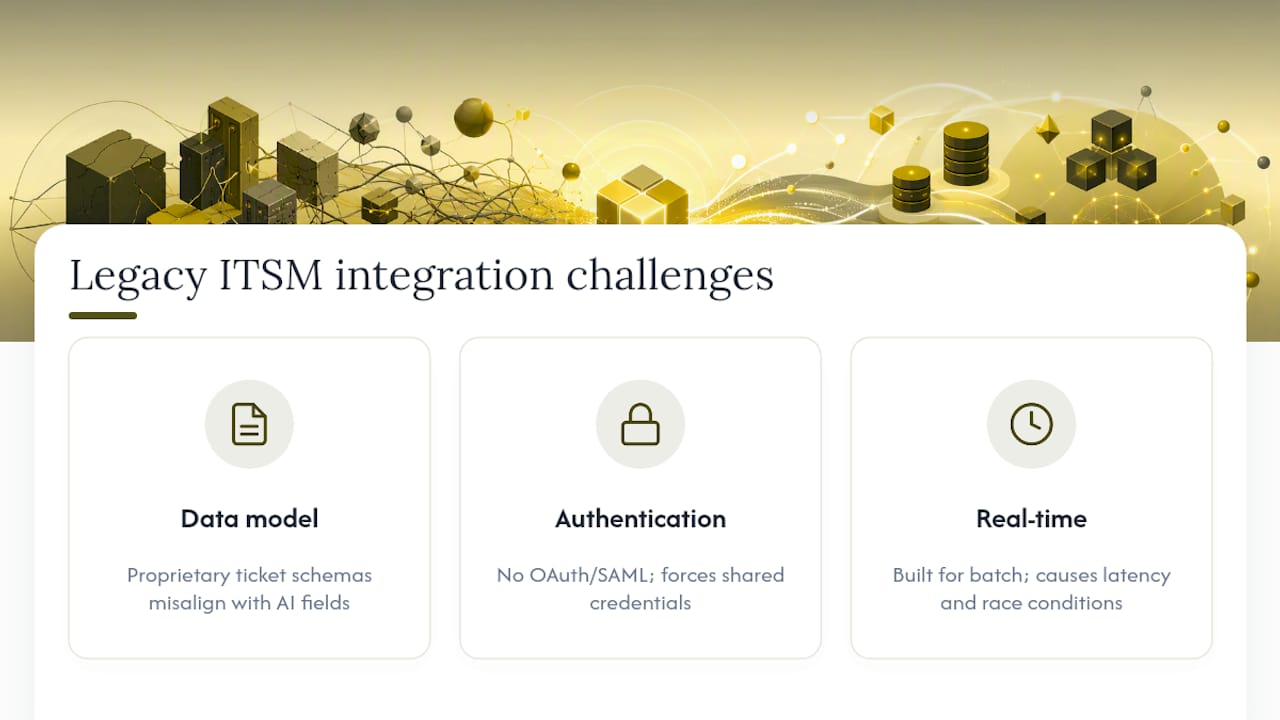
Three specific integration challenges appear repeatedly in production deployments:
Data model mismatches. Legacy systems often use proprietary ticket schemas that do not map cleanly to the AI platform’s expected fields. Intent classification trained on a standard schema will misfire when the ticket data it receives is structured differently.
Authentication and permission models. Older systems may not support modern OAuth or SAML-based service account authentication, forcing teams to use shared credentials — which conflicts directly with the least-privilege and audit-trail requirements that a secure AI deployment demands.
Real-time versus batch processing. Many legacy ITSM tools were built for batch updates, not real-time event streams. An AI agent that needs to read ticket state and write a resolution in near-real-time will encounter delays or race conditions that produce inconsistent behavior.
The mitigation path is to assess your ITSM system’s API capabilities before selecting an AI platform, not after. Require vendors to demonstrate a working integration with your specific system version in a staging environment during the evaluation phase. If a pre-built connector does not exist, factor the custom integration cost into your TCO before committing.
The case for treating AI governance as a security problem, not a feature
Most AI helpdesk evaluations treat governance — audit logs, approval gates, delegated permissions — as a compliance checkbox rather than a core security control. That framing is a mistake, and it is one that tends to surface at the worst possible moment: during an incident investigation when the audit trail is incomplete, or during a compliance audit when the data-processing agreement does not cover how ticket PII was handled.
The more accurate framing is this: every autonomous action an AI agent takes is a privileged operation executed under a service account with access to your identity infrastructure. The security controls you apply to that service account — least privilege, MFA where supported, activity monitoring, and anomaly alerting — should be identical to the controls you apply to any other privileged account in your environment. An AI agent that can reset passwords and provision licenses is, from a security architecture perspective, a privileged user. Treat it accordingly.
Teams that adopt this framing before deployment make better vendor decisions, configure tighter permission scopes, and catch integration misconfigurations before they reach production. Teams that treat governance as an afterthought tend to discover the gap when something goes wrong.
The practical implication for your pilot: before enabling any autonomous action, document the specific permission scope required, the approval workflow for sensitive actions, and the rollback procedure. That documentation is not overhead — it is the evidence your security team and auditors will ask for.
247techify’s AI-enabled managed IT support is built for security-first teams
For IT managers who need a production-ready AI support deployment without building the integration and governance layer internally, 247techify offers a managed alternative that is already structured for compliance-sensitive environments.

247techify’s AI helpdesk and managed IT services are built on a cybersecurity-first architecture, with 24/7 operations, a sub-30-minute response time, and documented compliance experience across HIPAA and PCI-DSS environments. For regulated industries where data residency, audit trails, and least-privilege execution are non-negotiable, that foundation matters more than any individual platform feature.
What 247techify brings to an AI support deployment:
- Pre-configured approval gates and delegated permission models for autonomous actions.
- Compliance-aware data handling with documented retention and processing policies.
- Rapid pilot-to-scale capability, with integration support for common PSA, IAM, and RMM environments.
- 24/7 human escalation backstop so no ticket falls through the automation gap.
If your team is ready to move from evaluation to a structured pilot, contact 247techify’s managed IT team to scope a deployment that fits your environment and compliance requirements.
Sources
- Gartner reviews — Freshworks (example market signals)
FAQ
Which AI approach works best for IT support?
How can AI be used in an IT helpdesk?
AI classifies inbound ticket intent, routes or resolves common requests via virtual agents, surfaces relevant runbooks to human agents, and executes pre-approved actions through integrations with identity, endpoint, and ticketing systems.
Is AI replacing IT support jobs?
Is AI taking over IT support?
AI is taking over specific, repetitive task categories within IT support, but complex incidents, security investigations, and governance decisions remain human responsibilities — the function is being redistributed, not eliminated.