
The most common startup data security oversights are not exotic hacks. They are configuration mistakes and skipped basics: no MFA, secrets committed to code, overprivileged cloud roles, and admin panels sitting exposed to the open internet. Statista’s breach tracking shows incident volume has stayed persistently high for years, and most of what lands startups in that dataset was preventable with an afternoon of work. Here is the list, with the first fix for each.
- Phishing and credential theft. Enforce multi-factor authentication on email and identity providers today.
- Misconfigured cloud storage or databases. Audit every S3 bucket, blob container, and database for public access flags this week.
- Secrets hardcoded in repositories. Scan git history with a secrets scanner and rotate anything exposed immediately.
- Weak or absent access controls. Move to role-based access and revoke standing admin rights you don’t actively use.
- No MFA on critical systems. Turn it on for cloud consoles, code repositories, and financial tools first, per NIST’s framework.
- Unpatched dependencies. Enable automated dependency and vulnerability scanning in your CI pipeline.
- Exposed admin panels. Put every management interface behind a VPN or IP allowlist.
- Inadequate logging and alerting. Centralize logs and set alerts for privilege escalation and failed logins.
- Untested backups. Run a real restore test this month, not just a backup job that “completed.”
- No incident response plan. Assign one owner and write a one-page response playbook.
- Unvetted third-party vendors. Require a security questionnaire before granting any vendor system access.
- Overprivileged cloud roles. Apply least-privilege policies and remove wildcard permissions (“:”) from IAM roles.
Key Takeaways
Startups get breached through preventable configuration failures, not sophisticated attacks, and fixing identity, secrets, and access controls first closes most of the real risk.
| Point | Details |
|---|---|
| Fix identity first | Enable MFA on every admin account and identity provider within the first week. |
| Hunt for exposed secrets | Scan git history and rotate any hardcoded credential immediately, then use a secrets manager. |
| Lock down public cloud resources | Audit every storage bucket and database for public access as part of the 0 to 7 day sprint. |
| Test backups quarterly | A backup that has never been restored is not a verified recovery plan. |
| Bring in expert coverage for 24/7 gaps | 247techify offers a sub-30-minute response commitment and managed security services built for startups scaling fast. |
Table of Contents
- Why Do Startups Keep Missing These Basics?
- What Are the Most Overlooked Technical and Operational Gaps?
- How Should You Prioritize These Fixes?
- What Should Your One-Page Security Checklist Look Like?
- When Does It Make Sense to Bring in a Managed Security Partner?
- How Do You Know Which Oversights Apply to Your Startup?
- Get a Startup Security Assessment Before Your Next Fundraise
- Where to Verify These Recommendations
- Sources
- FAQ
Why Do Startups Keep Missing These Basics?
Startups miss these fundamentals because of a resource gap, not a knowledge gap. Small teams build fast, hire faster, and rarely have anyone whose job is exclusively security. Proton’s research on startup security found that most breaches trace back to misconfigurations and identity failures rather than sophisticated attacks, which fits a pattern of teams that assume their cloud provider is handling more than it actually is.
That assumption is the core problem. Amazon Web Services, Microsoft Azure, and Google Cloud all operate on a shared-responsibility model: the provider secures the infrastructure, but the customer secures what runs on top of it, including access configuration, encryption settings, and identity policies. Founders who have never read their provider’s shared-responsibility documentation often believe security is bundled in.
These gaps tend to surface at predictable moments, not randomly:
- Early product launch, when speed wins over process and staging environments quietly stay open to the public internet.
- Rapid hiring, when new employees get broad access “to move fast” and offboarding never quite catches up.
- Cloud migration, when lift-and-shift projects carry over old permissions instead of resetting them.
- Investor due diligence, when a Series A term sheet suddenly requires a security questionnaire nobody prepared for.
A misconfigured admin dashboard or an open database is rarely the result of a targeted attack. It’s usually a developer who spun up a resource for testing, forgot to lock it down, and moved on to the next sprint. The oversight sits there, sometimes for months, until a scanner or an attacker finds it first.
This pattern shows up constantly in early-stage security reviews: a database left with no authentication because “it’s just internal,” an S3 bucket set to public during a demo and never reverted. None of it required advanced tradecraft to exploit.
What Are the Most Overlooked Technical and Operational Gaps?
Startups accumulate risk fastest in the gap between “it works” and “it’s secured,” and a handful of specific failure points show up again and again in early-stage assessments. One assessment of pre-Series A companies found hardcoded credentials, exposed admin tools, missing security headers, and undefined security ownership as recurring findings across dozens of startups. Here’s how to find and fix each one.
Hardcoded credentials and secrets in code
API keys, database passwords, and tokens committed straight into source code are one of the most common findings in startup codebases, and they persist in git history even after someone deletes the line in a later commit.
Quick check: Run a secrets scanner like Gitleaks or TruffleHog against your full repository history, not just the current branch.
Fix it: Rotate every exposed credential immediately, move secrets into a dedicated secrets manager (AWS Secrets Manager, HashiCorp Vault, or Doppler), and add a pre-commit hook that blocks new secrets from ever being pushed. Verify by re-running the scanner monthly.
Public cloud resources
Databases, storage buckets, and internal APIs get exposed to the public internet more often through default settings than through intentional choice.

Quick check: Pull a full inventory of storage buckets, databases, and compute instances and check each one’s public access setting in a single sitting.
Fix it: Set default deny on all new resources, restrict access by IP range or VPC, and use your cloud provider’s built-in configuration auditing (AWS Config, Azure Policy) to catch drift automatically going forward.
Missing security headers
Web applications without headers like Content-Security-Policy, Strict-Transport-Security, and X-Frame-Options are more vulnerable to cross-site scripting and clickjacking, two of the attack classes OWASP tracks as persistent risks for web applications.
Quick check: Run your production domain through a free header-scanning tool and note anything scored red or missing entirely.
Fix it: Add the headers at your reverse proxy or CDN layer (Cloudflare, Nginx) rather than in application code, so the fix applies uniformly across every service.
Exposed admin tooling
Internal dashboards, database admin panels (phpMyAdmin, Adminer), and CI/CD consoles left reachable from the public internet are frequent entry points, because they’re rarely designed with external attackers in mind.
Fix it: Put every admin interface behind a VPN, a zero-trust access proxy, or at minimum an IP allowlist. Test by attempting to reach each tool from outside your office network.
Overprivileged roles and weak authentication
“Everyone has admin access” is one of the most frequently cited startup failures, alongside missing MFA on the systems that matter most.
Fix it: Audit every account with elevated privileges and downgrade anyone who doesn’t need standing access. Enforce MFA on identity providers, cloud consoles, code repositories, and financial systems as a non-negotiable baseline, consistent with Sprinto’s list of top startup security oversights. Extending MFA and identity governance to shared productivity tools like Microsoft 365 closes one of the most commonly exploited gaps in small teams.
Pro Tip: Set a short session timeout and require re-authentication for sensitive actions like changing billing information or deleting production data. Most account takeovers rely on long-lived sessions that never get challenged again.
Missing patch and dependency management
Out-of-date libraries and unpatched servers stack up quietly, especially in fast-moving codebases where nobody owns the update cycle.
Fix it: Turn on automated dependency scanning (Dependabot, Snyk, or GitHub’s native alerts) and set a patch cadence, even a simple monthly one, for infrastructure and operating systems.
Inadequate logging and alerting
Without centralized logs, a breach can run for weeks before anyone notices. That silence is often more damaging than the initial intrusion.
Fix it: Route logs from your applications, cloud platform, and identity provider into a single tool, then set alerts for failed logins, privilege changes, and unusual data exports. Verify the alerts actually fire with a controlled test event.
Untested backups and disaster recovery
A backup that has never been restored is a hope, not a plan.
Fix it: Schedule a quarterly restore test and document the actual time it takes to recover a full environment. That number becomes your real recovery time objective, not the one on paper.
No incident response ownership
Pro Tip: Name one person, even part-time, as the incident response owner before you need one. In a crisis, “someone will figure it out” costs hours you don’t have. A one-page runbook with contact numbers and a communication template beats no plan every time.
Third-party and vendor risk
Every SaaS tool and contractor you grant system access to becomes part of your attack surface. Pathshield’s research on preventable startup breaches puts the immediate cost of a single breach at six figures or more once incident response, legal review, and customer notification are factored in, on top of the trust damage that’s harder to price.
Fix it: Require a basic security questionnaire before onboarding any vendor with data access, and review permissions quarterly to remove tools you no longer use.
Insufficient endpoint protection
Laptops and mobile devices without endpoint detection and response (EDR) coverage are an easy foothold for attackers, especially on remote teams.
Fix it: Deploy an EDR agent across every company-owned and BYOD device that touches production systems or customer data, paired with clear remote team security practices.
How Should You Prioritize These Fixes?
Fix identity and access controls and secrets first. Then patching and logging. Then backups and vendor management last, because that order maps to which oversights get exploited fastest and cost the least to fix.
Not every gap deserves equal attention on day one. Access controls and exposed secrets are what attackers scan for automatically, so they close the widest doors first. Patching and logging follow because they determine whether you catch an intrusion before it spreads. Backups and vendor management matter enormously but tend to play out over longer timelines.
| Timeframe | Priority actions | Approximate effort | Cost shape | Expected outcome |
|---|---|---|---|---|
| 0 to 7 days | Enable MFA everywhere, rotate exposed secrets, lock down public cloud resources | 1 to 2 people, 8 hours | Low | MFA coverage at a high level, zero public storage misconfigurations |
| 8 to 30 days | Implement least privilege, deploy dependency scanning, centralize logging | 1 to 2 people, part-time over the month | Low to medium | Access audit complete, automated alerts firing on key events |
| 31 to 90 days | Test backups, formalize incident response plan, vet top vendors, roll out EDR | 2 to 3 people, ongoing part-time | Medium | Verified recovery time, documented runbook, vendor risk register |
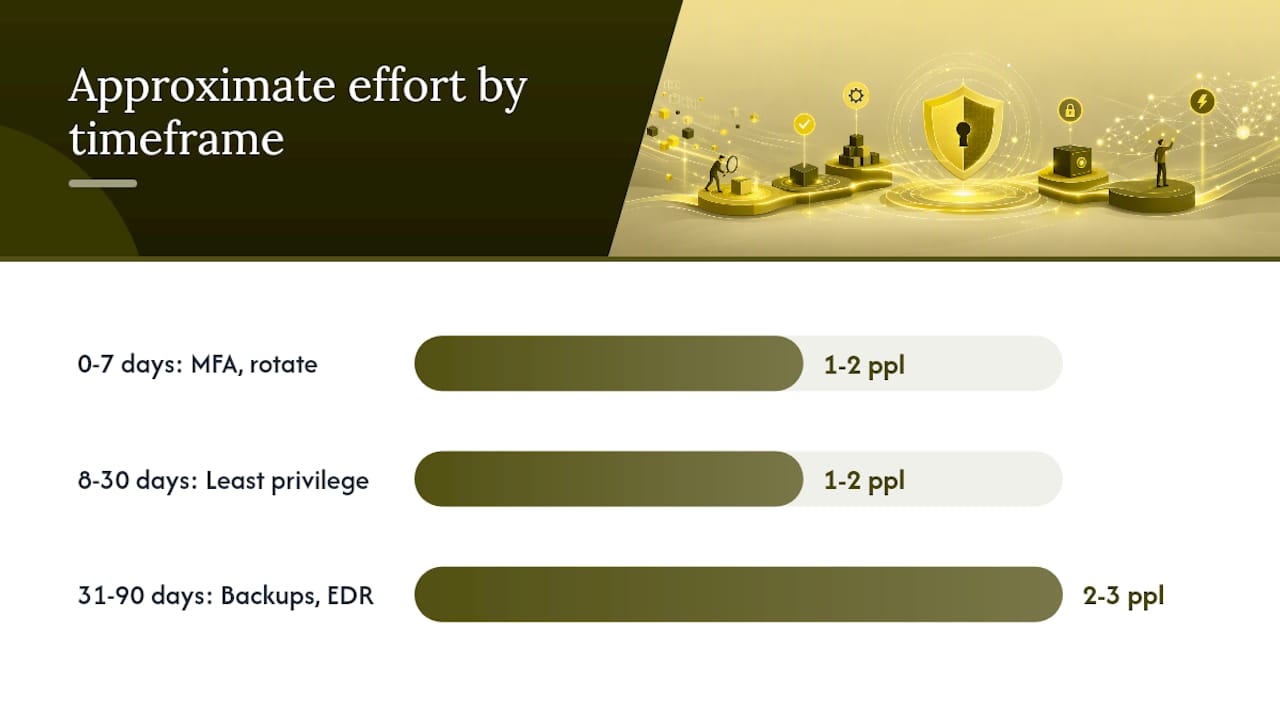
When developer time is scarce, use compensating controls to buy time rather than skipping the fix entirely. An exposed admin panel you can’t immediately redesign can be temporarily wrapped behind an IP allowlist while a proper access proxy gets built. A dependency you can’t upgrade this sprint can be isolated behind a web application firewall rule until the patch lands.
Track progress with a small set of KPIs instead of a vague sense of “we’re more secure now”:
- MFA coverage percentage across identity providers, cloud consoles, and financial systems.
- Secrets rotated and removed from repositories, tracked as a count against your initial scan findings.
- Mean time to detect suspicious activity, measured from your centralized logging setup.
- Backup restore success rate, confirmed through actual quarterly test restores, not job completion status.
What Should Your One-Page Security Checklist Look Like?
A founder-ready checklist works best organized by timeframe, with each line mapped to the type of tool that solves it.
Days 0 to 7: Enable MFA across identity providers and cloud consoles (an SSO/identity provider like Okta, Microsoft Entra ID, or Google Workspace handles this). Scan repositories for secrets and rotate anything exposed (a secrets manager like Vault or Doppler). Lock down public cloud storage and databases.
Days 8 to 30: Apply least-privilege access reviews. Turn on automated dependency scanning (Snyk, Dependabot, or Trivy catch outdated and vulnerable packages before attackers do). Centralize logs into one platform (a lightweight SIEM tool gives you the alerting layer most startups skip entirely).
Days 31 to 90: Test backup restores and document real recovery times (immutable backup tools prevent ransomware from encrypting your recovery copies too). Vet your top five vendors by data access level (a vendor risk platform or even a structured questionnaire closes this gap). Deploy endpoint detection and response across every device touching production data.
When evaluating tools in any of these categories, watch for red flags: vendors that can’t explain their own data retention policy, pricing that requires a multi-year commitment before you’ve tested the product, or a sales process that avoids technical questions about encryption and access logging. A tool worth trusting with your infrastructure should answer those questions without hesitation.
When Does It Make Sense to Bring in a Managed Security Partner?
A cybersecurity-first managed IT provider covers what a two-person engineering team physically cannot: round-the-clock monitoring, faster incident response, and DevOps security support without a full-time hire. That gap is exactly where early-stage teams get caught, usually at 2 a.m. on a weekend.
Look for these service items when evaluating a partner:
- MFA rollout and identity governance across your cloud and productivity stack
- Secrets management setup and dependency scanning integration
- Endpoint detection and response (EDR) deployment across all devices
- SIEM and alerting configuration tied to a defined response process
- Backup and immutable recovery with tested restore procedures
Before signing anything, demand specifics: mean time to respond (ask for a number, not “fast”), monitoring coverage hours, documented runbooks for common incident types, and clear recovery time and recovery point objectives for backups. A provider that can’t state these in writing isn’t ready to be your security partner. 247techify structures its managed services around a sub-30-minute response commitment and 24/7 coverage, which matters most in the exact scenario startups fear: an incident discovered outside business hours with no one senior awake to triage it.
How Do You Know Which Oversights Apply to Your Startup?
Start with a lightweight self-assessment rather than a full external audit, which most early-stage teams can’t justify cost-wise yet. Map your current identity setup: who has admin access, where MFA is missing, and whether any accounts belong to people who left the company months ago.
Next, run a technical scan across three surfaces: your codebase for hardcoded secrets, your cloud console for public-facing resources, and your public domains for missing security headers. Each takes under an hour with free or low-cost tools and surfaces the highest-frequency oversights first.
Then look at your organizational maturity honestly. Do you have a named security owner, even part-time? Is there a written incident response process, or would the first breach be the first time anyone thought about who calls whom? Startups preparing for Series A due diligence often discover these organizational gaps matter as much to investors as the technical ones.
Weight your findings by business impact, not by what’s easiest to fix. A missing security header is a quick win, but an admin account with no MFA sitting on your production database is the one that gets you breached first.
What the 247techify Team Sees Most Often
The most common pattern across early-stage clients is not ignorance. It’s deferred ownership. Someone knows MFA should be enabled everywhere; nobody has been assigned to actually do it. The startups that ramp security well don’t stop shipping to fix this. They fold identity and access work into existing sprints and treat security as one more backlog item with an owner and a deadline, not a separate project competing for time. Teams that succeed tend to fix the highest-risk items first and build from there, rather than chasing a perfect security posture before their first paying customer.
Get a Startup Security Assessment Before Your Next Fundraise
A focused security assessment gives you a prioritized list of exactly which gaps from this article apply to your systems, ranked by real business risk instead of guesswork. 247techify builds that assessment around the same 0 to 90 day framework covered here, then helps close the gaps directly.

Three engagement paths fit different stages:
- Quick audit: A focused review of identity, cloud configuration, and secrets exposure, delivered with a prioritized remediation list.
- Co-managed security: Your team keeps control of day-to-day operations while co-managed IT support covers monitoring, alerting, and incident response.
- Full managed services: Complete 24/7 coverage including endpoint protection, backup management, and compliance support for regulated industries like healthcare and finance.
Startups moving fast toward a fundraise or a compliance requirement typically start with the quick audit and expand from there. If you’re ready to see exactly where your gaps sit, explore 247techify’s managed IT services and request an assessment this week.
Where to Verify These Recommendations
Key resources to validate and extend these recommendations include:
- NIST Cybersecurity Framework: the authoritative structure for assessing and prioritizing security controls at any company size.
- Statista’s breach data: ongoing figures on breach frequency and records exposed.
- Mucker Capital’s pre-Series A security gap review: a detailed look at recurring technical gaps in early-stage companies.
- Proton’s tech startup security research: analysis of why founders underestimate cloud shared-responsibility risk.
- 247techify’s network security checklist: a practical, small-business-focused extension of the fixes covered here.
Sources
FAQ
What Are the 5 C’s of Security?
Definitions vary across frameworks, but common versions cover Change, Compliance, Cost, Continuity, and Coverage as pillars for evaluating a security program’s maturity. Startups get more practical value from tracking specific controls like MFA coverage and patch cadence than from memorizing the acronym.
Where Do Most Cyberattacks on Startups Begin?
Most incidents begin with misconfigurations, weak identity controls, and human error like phishing rather than advanced exploits, according to Proton’s research. Hardcoded secrets and exposed cloud resources are the next most common entry points.
What Are the Top Cybersecurity Threats Startups Face?
The most frequent threats include phishing, exposed cloud storage, missing MFA, unpatched dependencies, and third-party vendor access, based on recurring findings across multiple startup security assessments. Each is preventable with the fixes outlined earlier in this article.
Can Cybersecurity Careers Pay $500,000 a Year?
Senior cybersecurity leadership roles, particularly at large enterprises or in high-demand specializations, can reach that range, though the vast majority of cybersecurity salaries fall well below it. Compensation depends heavily on role, company size, and geographic market rather than the field itself.
How Quickly Should a Startup Respond to a Security Incident?
A documented incident response plan with a named owner should allow initial containment within hours, not days. 247techify’s managed services structure their commitment around a sub-30-minute initial response window specifically to close that gap for teams without in-house 24/7 coverage.