
RTO measures how long your business can survive without a system before the outage itself becomes the disaster; RPO measures how much data you can afford to lose, counted backward from the moment things went wrong. RTO runs forward in time from the incident to full recovery. RPO runs backward from the incident to the last clean backup or replica. Both figures should be set per workload, not company-wide, and weighed against the cost of the infrastructure required to hit them and whatever compliance obligations govern that data.
TL;DR:
- Setting RTO and RPO based on the Business Impact Analysis and Maximum Tolerable Downtime ensures recovery targets are both realistic and financially justified.
- Tiering applications into four levels from mission-critical to low priority helps allocate disaster recovery resources effectively without overspending.
- Achieving tight RTO and RPO targets requires specific architectures such as synchronous or asynchronous replication, continuous data protection, and hot or warm failover sites.
- Regular testing of recovery processes and actual measurement of restore times and data loss are essential to validate that recovery objectives are achievable.
- Costs increase exponentially as recovery targets approach zero, so organizations must balance risk, budget, and compliance needs carefully.
Table of Contents
- RTO vs RPO: The Side-By-Side Comparison
- How to Calculate RTO and RPO Without Guessing
- Mapping RTO and RPO to Application Tiers
- Technical Methods to Hit Your RTO and RPO Targets
- Testing and Validation: Proving RTO and RPO Are Real Numbers
- Where RTO and RPO Targets Go Wrong
- Your Next-Quarter Checklist for Setting RTO and RPO
- What We’ve Learned Setting RTO and RPO for Regulated Clients
- Getting Your RTO and RPO Targets Actually Built
- Where to Verify These Standards Yourself
- Sources
- FAQ
RTO vs RPO: The Side-By-Side Comparison
The confusion between these two metrics usually comes down to direction. RTO answers “how long until we’re back up?” RPO answers “how much work or data are we willing to lose forever?” Get the direction wrong in a planning meeting and you’ll end up sizing your backup infrastructure for the wrong problem.
They’re also owned by different people in practice, even though both usually get filed under “disaster recovery.” RTO tends to be an infrastructure and orchestration problem, owned by whoever controls failover architecture, DNS cutover, and application startup sequencing. RPO is a data problem, owned by whoever controls backup frequency, replication topology, and snapshot scheduling.
- Direction of measurement: RTO counts forward from the moment of failure to restored service; RPO counts backward from the failure to the last good data point.
- Typical units: RTO is usually expressed in minutes or hours; RPO is usually expressed in minutes for transactional systems and hours for less critical ones.
- Who controls it: RTO is shaped by infrastructure teams (failover design, automation, network cutover); RPO is shaped by backup and storage teams (replication cadence, snapshot intervals).
- E-commerce checkout: A five-minute RTO keeps the cart flow alive during a regional outage; a near-zero RPO keeps you from losing paid orders that never made it to the database.
- Core transactional database: Losing 15 minutes of RPO on a finance ledger means reconstructing transactions by hand, which is often worse than the outage itself.
- Electronic health record (EHR) system: Regulatory and patient-safety requirements usually push both RTO and RPO toward the tightest end of the spectrum, regardless of cost, because clinicians need current data the moment systems come back.
How to Calculate RTO and RPO Without Guessing
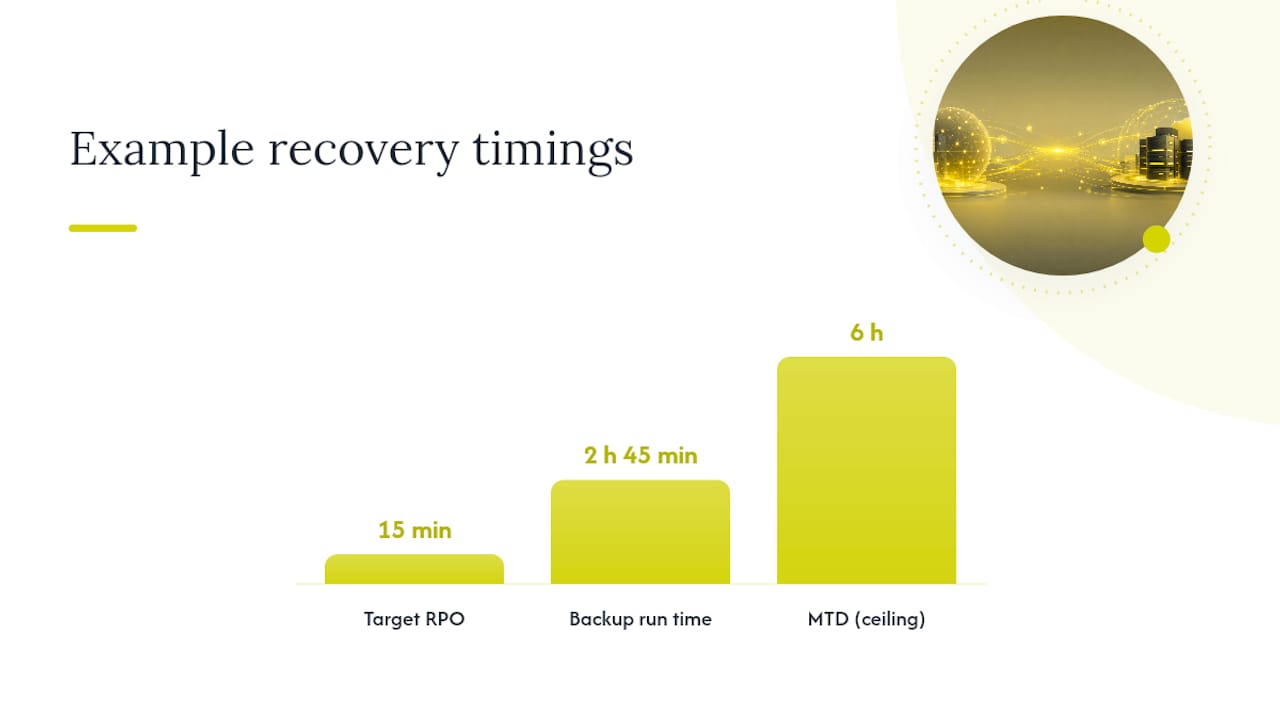
Most organizations set RTO and RPO by instinct, then discover during a real outage that the numbers were fiction. A defensible target comes from a Business Impact Analysis (BIA) paired with a Maximum Tolerable Downtime (MTD) figure for each critical business function. MTD tells you the outer boundary of survivable downtime; RTO always sits inside that boundary, with margin for error.
Here’s a repeatable sequence:
- Run the BIA first. Identify which business processes depend on which systems, and quantify what an hour of downtime costs each one in lost revenue, contractual penalties, or regulatory exposure.
- Set MTD per function. This is the absolute ceiling. If a payment gateway going dark for six hours triggers breach-of-contract penalties, your MTD is under six hours, full stop.
- Calculate RPO from data-change rate. Look at how fast the data actually changes and what it costs to recreate lost records manually. A retail order system processing 200 transactions an hour that can’t tolerate re-entering more than 50 orders by hand implies an RPO around 15 minutes, which in turn means backups or replication need to run at least that often.
- Calculate RTO by mapping every recovery step, not just the technical ones. Add up restore time, failover orchestration, DNS propagation, application warm-up, and the manual business steps: finance sign-off, customer notification, regulator disclosure if required. Azure’s reliability guidance is blunt about this: effective RTO includes the full restore duration, and the only way to know that duration is to test it, not estimate it.
- Check the numbers against compliance and budget before finalizing. Get sign-off from legal, finance, and the business unit owner. A target nobody agreed to fund isn’t a target, it’s a hope.
Pro Tip: Calculate RPO using the time your last backup actually completed and was verified, not the time the backup job started. A nightly job that finishes at 2:45 a.m. after starting at midnight has already eaten into your stated recovery point.
NIST’s SP 800-34 Rev. 1 contingency planning guide frames this entire exercise as a cost tradeoff: recovery objectives should come from what downtime costs the business, weighed against what tighter recovery infrastructure costs to build.
Mapping RTO and RPO to Application Tiers
Not every system deserves a five-minute RTO, and pretending otherwise is how disaster recovery budgets balloon without actually reducing risk. AWS’s tiering guidance recommends sorting applications into tiers first, then assigning aggressive targets only where the business impact justifies the spend.
A practical four-tier structure looks like this:
- Tier 0, mission-critical: RTO under 15 minutes, RPO near zero. Payment processing, core transactional databases, authentication systems. Requires synchronous replication or continuous data protection and a hot standby site.
- Tier 1, business-critical: RTO of 1 to 4 hours, RPO of 15 to 60 minutes. Order management, EHR systems, customer-facing applications. Usually asynchronous replication plus automated failover.
- Tier 2, important but not urgent: RTO of 4 to 24 hours, RPO of several hours. Internal reporting tools, HR systems, CRM platforms. Standard backup schedules with a warm or cold standby.
- Tier 3, low priority: RTO of 24 to 72 hours, RPO of 24 hours or more. Internal file shares, archived records, test environments. Nightly or weekly backups are usually enough.
The gap between tiers is where the real money sits. A transactional database sized for Tier 0 might justify six figures a year in replicated infrastructure. An internal file share sized for Tier 3 might run on a scheduled backup job that costs almost nothing extra. Sorting workloads correctly before you build anything is what keeps a disaster recovery budget from consuming the whole IT spend.
Technical Methods to Hit Your RTO and RPO Targets
Once targets are set, the engineering choice becomes straightforward: what architecture actually delivers those numbers at a cost the business will accept?
Backup cadence sets your RPO ceiling. If backups run every four hours, your best-case RPO is four hours, and that’s before accounting for backup completion time. SentinelOne notes that an hourly backup job taking 45 minutes to finish and verify doesn’t give you a clean hourly RPO; it gives you something closer to 105 minutes once verification is included.
Replication mode determines how close to zero you can push RPO. Synchronous replication writes to primary and secondary storage simultaneously, which drives RPO toward zero but adds latency that can hurt performance if the secondary site is geographically distant. Asynchronous replication tolerates that distance but reintroduces a data gap, usually seconds to minutes, depending on network conditions.
Continuous data protection (CDP) captures every write as it happens rather than at scheduled intervals, which is how organizations get RPO down to seconds for genuinely critical systems. It costs more in storage and processing overhead, which is exactly why it belongs on Tier 0 workloads and nowhere else.
Failover site strategy is what drives RTO. A hot site, a fully live standby environment ready to take traffic immediately, gets you the fastest RTO but costs roughly as much to run as your production environment. A warm site keeps infrastructure provisioned but idle, cutting cost while adding minutes to hours of spin-up time. A cold site is cheapest and slowest, often measured in days.
- Immutable, air-gapped backups protect your recovery point from being encrypted alongside production during a ransomware event, a scenario worth reviewing in detail before you finalize your architecture.
- Orchestration tooling that automates failover sequencing, DNS cutover, and dependency startup order removes the human delay that manual runbooks introduce under pressure.
- Runbook automation cuts the variance between “how fast recovery should go” and “how fast it actually goes at 2 a.m. with half the team unreachable.”
Pro Tip: Don’t assume replication lag is zero just because your dashboard says “in sync.” Measure actual lag under peak write load, not idle conditions, because that’s when your real RPO gets tested.
Testing and Validation: Proving RTO and RPO Are Real Numbers
A recovery objective that has never been tested is a guess wearing a suit. Microsoft’s guidance on business continuity is direct about this: you have to test restores to know your real RTO, because theoretical restore times and measured ones rarely match.
- Map dependencies before running a drill. A database can fail over cleanly while the application layer that depends on it still points to the old connection string. Test the whole chain, not one component.
- Measure Mean Time to Recovery (MTTR) on every drill and compare it directly against your stated RTO. A gap here means either your architecture needs work or your target was unrealistic to begin with.
- Verify recovery points, not just backup completion. Confirm the restored data is current, uncorrupted, and, critically, free of malware, since restoring a backup taken after an infection just recreates the problem.
- Set a test cadence and report results upward. Quarterly drills for Tier 0 and Tier 1 systems, annual for lower tiers, with findings documented for whoever owns compliance sign-off.
Where RTO and RPO Targets Go Wrong
Tightening recovery targets sounds like pure upside until the invoice arrives. Pushing RTO and RPO toward zero across the board doesn’t scale linearly. It scales exponentially, because each additional minute shaved off usually requires an entirely new tier of infrastructure rather than a small tweak to the existing one.
- Cost curves aren’t linear. Moving from a four-hour RTO to a one-hour RTO might double your infrastructure spend; moving from one hour to five minutes might quadruple it again.
- Manual steps get forgotten in testing. Teams often achieve a clean technical failover while forgetting that finance still needs to approve the cutover or a regulator still needs notification, and those manual steps keep the business functionally offline even after servers are back.
- Replication lag and backup verification eat into stated targets. A backup job that “completes” doesn’t mean it’s verified, and unverified restore points are a liability disguised as a safety net.
- Security incidents extend RTO well beyond infrastructure math. SentinelOne’s research points out that ransomware recovery routinely runs 24 to 72 hours for critical systems once forensic investigation and cleanup are factored in, even when the underlying infrastructure could theoretically recover in minutes.
Your Next-Quarter Checklist for Setting RTO and RPO
- Gather what already exists. Pull your last BIA, current transaction rates per system, and results from any past restore tests. If none of this exists yet, that’s your starting point.
- Classify every application into a tier, then pick two or three pilot workloads, ideally one Tier 0 and one Tier 2, to validate the whole process before rolling it out company-wide.
- Schedule real restore tests for the pilot workloads within 30 days, not “sometime this year.”
- Grab the cheap wins first. Immutable snapshots and a faster restore process for one critical system often cut effective RTO and RPO meaningfully without a full architecture overhaul.
- Get formal sign-off from compliance, finance, and the business owner, and put a recurring review on the calendar so targets don’t quietly go stale.
What We’ve Learned Setting RTO and RPO for Regulated Clients
Every engagement follows roughly the same arc: assess current state, tier the applications, build or adjust the architecture, then test until the numbers hold under pressure, not just on paper. The pattern that surprises clients most often isn’t the technology. It’s discovering how many “critical” systems were never actually tiered, just assumed critical because nobody had challenged the assumption.
The recurring operational snag is communication, not infrastructure: stakeholders forget what their signed-off RTO actually commits them to until a real incident forces the question. Frequent test cadence and plain-language reporting solve that faster than any tooling upgrade.
— 247techify Team
Getting Your RTO and RPO Targets Actually Built
Reading about tiered recovery and backup architecture is one thing. Standing up immutable snapshots, replication, and tested failover for a healthcare or finance environment on top of a normal workload is another. 247techify handles that build-out end to end for Canadian businesses that need HIPAA or PCI-DSS-aligned recovery without hiring a dedicated DR engineer.

A typical engagement runs assessment, then tiering, then implementation, then scheduled test restores, with 24/7 monitoring layered in throughout so a real incident doesn’t wait for business hours. The relevant pieces include managed backup and disaster recovery built around the tier-based approach covered above, ransomware-resistant immutable backup design, and compliance expertise for regulated data. If you want a second set of eyes on whether your current RTO and RPO targets would survive an actual test, start with 247techify’s managed IT services and get a real assessment scheduled this quarter.
Where to Verify These Standards Yourself
For the governance and cost-tradeoff framework behind recovery objectives, NIST SP 800-34 Rev. 1 is the primary federal standard. For cloud-specific tiering guidance, see AWS’s RPO/RTO framework and Microsoft’s reliability documentation, both of which detail restore-time testing procedures worth following before finalizing any target.
Sources
- Establishing RPO and RTO targets for cloud applications — AWS
- Business continuity, high availability, and disaster recovery — Microsoft Learn
- Contingency Planning Guide for Federal Information Systems (SP 800-34 Rev.1) — NIST
- RTO vs RPO: Key Differences in Disaster Recovery Planning — SentinelOne
FAQ
What is the difference between RTO and RPO?
RTO measures maximum acceptable downtime, counted forward from an incident to full recovery; RPO measures maximum acceptable data loss, counted backward from the incident to the last clean recovery point.
How is RPO calculated?
RPO is calculated from your data-change rate and the cost of recreating lost records manually, then matched to a backup or replication cadence frequent enough to stay within that loss tolerance.
What does RTO mean for disaster recovery?
RTO sets the deadline for restoring a system to operation after a failure, and a realistic RTO must include restore time, failover orchestration, and any manual business steps like sign-offs or regulator notifications.
What is an RPO in disaster recovery?
RPO is the maximum amount of data, measured in time, that a business can afford to lose during an outage, and it directly determines how often backups or replication need to run.
What is the difference between RTO and MTD?
MTD (Maximum Tolerable Downtime) is the absolute outer limit a business function can survive without failing entirely; RTO is the specific, planned recovery target set inside that limit, with margin built in for unexpected delays.