
Help desk support is a centralized system that captures incoming user issues, routes them through structured workflows, and delivers timely resolutions to maintain business continuity. Understanding how help desk support works is not optional for IT managers. It is the operational foundation that determines whether your organization responds to problems in minutes or days. This guide covers the full ticket lifecycle, triage logic, SLA frameworks, and automation practices that separate high-performing support operations from reactive ones.
How help desk support works: the core system explained
Help desk support, formally known as an IT service desk in ITIL (Information Technology Infrastructure Library) terminology, is a single point of contact between users and IT resources. Its core function is to capture every reported issue as a structured record, assign ownership, and track resolution from first contact to closure. Without this structure, issues fall through the cracks, duplicate work accumulates, and IT teams lose visibility into what is actually breaking.
The ticketing system is the engine that makes this possible. Every request, whether submitted by email, phone, live chat, or a self-service portal, becomes a ticket with a unique ID, timestamp, and status. That record follows the issue through its entire lifecycle. Service desk SOPs standardize performance so new hires operate identically to senior agents via scripts, priorities, and handoff procedures. Consistency at this level is what separates a professional support operation from an ad hoc one.

Three organizational benefits define why businesses invest in formal help desk systems. First, faster resolutions: structured routing eliminates the guesswork of “who handles this?” Second, consistent service: every user gets the same intake process regardless of which agent picks up. Third, operational transparency: managers see queue depth, resolution times, and recurring issues in real time.
What is the help desk ticketing process step by step?
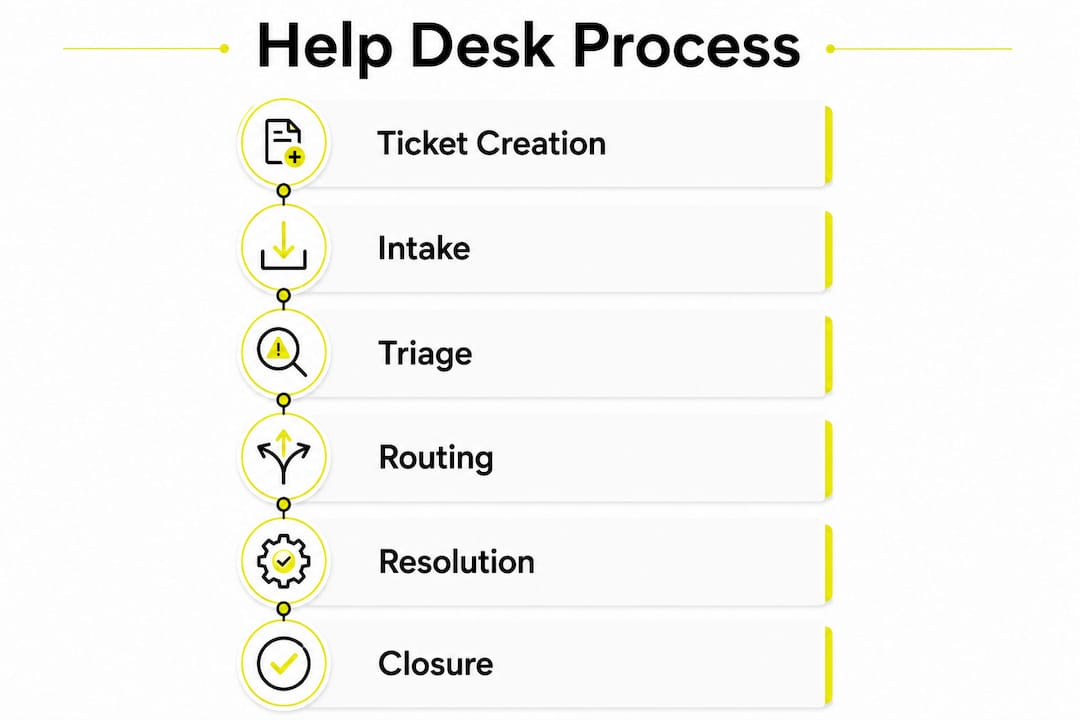
The ticket lifecycle is the operational backbone of any help desk. Each stage has a defined purpose, and skipping one creates downstream problems.
-
Ticket creation. A user submits an issue through email, phone, chat, or a web portal. The channel does not matter. What matters is that the system captures it immediately and assigns a unique ticket ID.
-
Structured intake. Structured intake forms capturing device names, error codes, and business impact reduce back-and-forth and speed resolution. Poor intake at this stage forces agents to ask clarifying questions, which delays triage and frustrates users.
-
Triage and categorization. An agent or automated rule reviews the ticket, assigns a category (hardware, software, access, network), and sets an initial priority. This step determines which queue the ticket enters and which team handles it.
-
Routing and assignment. The ticket moves to the correct support tier. Tier 1 handles password resets and common software issues. Tier 2 handles more complex configurations. Tier 3 escalates to specialists or vendors.
-
Active resolution. The assigned agent works the issue, documents every action taken, and updates the ticket status. Status labels include “Open,” “In Progress,” “On Hold,” “Resolved,” and “Closed.” Each label communicates the current state to both the user and the team.
-
Closure with cooling-off period. The “Closed” status is applied after a resolution and a 24–72 hour cooling-off period, allowing the user to reopen the ticket if the issue persists. This window protects users from premature closures while keeping queues clean.
Pro Tip: Set your ticketing system to auto-notify users when their ticket moves from “Resolved” to “Closed.” This single touchpoint reduces reopen rates and improves satisfaction scores without adding agent workload.
What is help desk triage and why is it critical for efficiency?
Triage is the process of evaluating an incoming ticket to determine its category, severity, and correct routing path before any resolution work begins. In a busy IT environment, triage is the filter that separates noise from actionable incidents.
Effective triage delivers four specific outcomes:
- Duplicate detection. Strong triage reduces waste by identifying duplicates early and linking multiple reports to a single incident. When ten users report the same email outage, triage merges those tickets into one, preventing ten agents from working the same problem simultaneously.
- Priority assignment. Initial priority assignment for an incoming ticket should occur within 10 minutes to ensure high-impact issues are routed appropriately. Delays at this stage push critical issues into general queues where they age without escalation.
- Tier routing. Triage determines whether a ticket belongs at Tier 1, Tier 2, or Tier 3. Misrouting wastes specialist time on basic issues and leaves complex problems with agents who lack the tools to resolve them.
- SLA clock activation. The moment a ticket is triaged and prioritized, its SLA timer starts. Accurate triage ensures the right timer applies. A P1 ticket miscategorized as P3 will breach its actual SLA before anyone notices.
Automated triage rules handle high-volume, predictable patterns well. Keyword detection, sender domain rules, and category classifiers can route the majority of tickets without human review. Human judgment remains necessary for ambiguous or high-stakes issues where context matters.
Pro Tip: Require agents to enter a mandatory reason code and a follow-up date any time they set a ticket to “On Hold.” Without this control, “On Hold” becomes a parking lot where tickets age invisibly.
How prioritization and SLAs ensure timely and fair ticket handling
Prioritization is the process of ranking tickets by the combination of urgency (how quickly the issue must be addressed) and impact (how many users or systems are affected). These two factors together determine a ticket’s priority level, typically labeled P1 through P4.
Service Level Agreements (SLAs) translate those priority levels into contractual response and resolution time commitments. Standard SLA targets define first response times as 15 minutes for P1 critical issues, 1 hour for P2, 4 hours for P3, and 1 business day for P4 requests. These targets create accountability and give users a concrete expectation.
| Priority | Label | First Response Target | Typical Example |
|---|---|---|---|
| P1 | Critical | 15 minutes | Full system outage, security breach |
| P2 | High | 1 hour | Core application down for a team |
| P3 | Medium | 4 hours | Feature malfunction affecting one user |
| P4 | Low | 1 business day | General inquiry, minor cosmetic issue |
SLA breach escalation rules are the enforcement mechanism. When a P1 ticket approaches its 15-minute response window without agent action, the system automatically alerts a supervisor or escalates to a senior tier. Without these automated triggers, SLA breaches go unnoticed until a user complains. SLA tracking dashboards give IT managers real-time visibility into queue health, breach rates, and team responsiveness, making it possible to identify bottlenecks before they become service failures.
How does help desk automation improve support efficiency?
Automation removes the manual steps that slow down ticket handling without adding diagnostic value. The result is faster resolution and lower agent workload on routine tasks.
The most impactful automation categories in a modern help desk include:
- Auto-routing rules. Tickets submitted with specific keywords or from specific email domains route automatically to the correct team. A ticket containing “VPN” routes to network support. A ticket from the finance department routes to the finance IT queue.
- Canned responses and macros. Agents trigger pre-written responses for common issues like password resets or software installation requests. This reduces first response time without sacrificing accuracy.
- AI classifiers. Machine learning models read ticket content and assign categories and priority levels automatically. This accelerates triage for high-volume environments where manual review creates bottlenecks.
- Knowledge base deflection. Self-service portals surface relevant knowledge base articles before a user submits a ticket. If the article resolves the issue, no ticket is created. This deflection reduces total ticket volume.
- Chatbots for Tier 1 resolution. Chatbots handle password resets, account unlocks, and status checks autonomously. Automated workflows and AI have reduced Mean Time To Resolve from 4 hours to under 1 hour in documented cases by removing manual routing delays. That improvement directly affects user productivity and IT team capacity.
The risk with automation is over-reliance. Automated routing misclassifies edge cases. Chatbots fail on nuanced issues. The best practice is to build human review checkpoints for any ticket that automation flags as uncertain, rather than letting misclassified tickets age in the wrong queue.
Common challenges in help desk support and how to fix them
Even well-designed help desk operations develop operational problems over time. Most of them trace back to a small set of recurring failures.
Tickets placed “On Hold” without mandatory reason codes often become inactive, masking delays and misleading management on true workflow health. This is the “parking lot” problem. Tickets sit in “On Hold” status indefinitely because no one is accountable for the next action. The fix is simple: require a reason code and a follow-up date at the point of status change, and configure the system to alert the agent when that date passes.
Poor intake quality is the second major failure point. When users submit vague descriptions like “my computer is slow,” agents spend the first exchange asking for basic details that a structured intake form would have captured automatically. Higher-quality intake improves triage and resolution efficiency by reducing these repetitive communication loops. The fix is a mandatory intake form with fields for device name, error message, and business impact.
Unclear ownership creates a third category of failure. When a ticket transfers between tiers without a documented handoff, the receiving agent lacks context and the user receives no update. Documented handoffs with required notes at each transfer point prevent this. Clear communication through acknowledgment, status updates, and estimated resolution times improves customer satisfaction and reduces inbound status inquiries. Finally, help desks that analyze recurring issues transform from reactive support centers into intelligence hubs that inform IT planning and prevent future incidents.
Key Takeaways
A well-run help desk is a structured system where ticket lifecycle discipline, accurate triage, SLA enforcement, and targeted automation combine to deliver consistent, measurable IT support.
| Point | Details |
|---|---|
| Ticket lifecycle has six stages | Creation, intake, triage, routing, resolution, and closure each require defined ownership and documented actions. |
| Triage must happen within 10 minutes | Delayed priority assignment pushes critical issues into general queues where they breach SLAs undetected. |
| SLAs set enforceable time targets | P1 tickets require a 15-minute first response; P4 tickets allow 1 business day, with escalation rules for breaches. |
| Automation cuts resolution time significantly | AI routing and chatbots have reduced Mean Time To Resolve from 4 hours to under 1 hour in documented deployments. |
| “On Hold” tickets need strict controls | Require mandatory reason codes and follow-up dates to prevent tickets from aging invisibly in stalled queues. |
The help desk is your IT operation’s early warning system
Most IT managers treat the help desk as a cost center. That framing is wrong, and it leads to chronic underinvestment in the one system that sees every failure before leadership does.
After working with Canadian businesses across healthcare, finance, and professional services, the pattern is consistent. Organizations that treat ticket data as intelligence, not just workload, catch infrastructure problems weeks before they become outages. A cluster of “slow network” tickets from one office floor is not noise. It is a signal that a switch is failing. A spike in password reset requests on a Monday morning is not routine. It may indicate a credential policy change that was not communicated to users.
The triage and prioritization frameworks described in this article are not bureaucratic overhead. They are the mechanism that converts raw user complaints into structured, actionable data. When you enforce intake quality, require reason codes on holds, and track SLA breach rates by category, you build a picture of your IT environment that no monitoring dashboard alone can provide.
Automation deserves the same disciplined approach. The goal is not to remove humans from support. The goal is to remove humans from the tasks that do not require judgment, so they are available for the ones that do. A chatbot handling password resets at 2:00 AM is not replacing your team. It is protecting your team’s capacity for the P1 incident that arrives at 2:15 AM.
For IT managers at 247techify, the consistent finding is that organizations with mature help desk processes have shorter incident response times, lower repeat ticket rates, and higher user satisfaction scores. The process is the product.
— 247techify Team
247techify’s managed IT and help desk services for Canadian businesses
Running a help desk at the level described in this article requires the right people, processes, and tools operating around the clock. Most internal IT teams cannot sustain that coverage without gaps.

247techify delivers managed IT support services built on a cybersecurity-first foundation, with a guaranteed response time of under 30 minutes and 24/7 coverage for Canadian businesses. The team manages the full ticket lifecycle, from structured intake through triage, resolution, and closure, while maintaining compliance with HIPAA and PCI-DSS standards for regulated industries. With a 98% client satisfaction rate, 247techify gives IT managers the operational depth to handle critical incidents without burning out internal staff. If your current help desk is creating more problems than it solves, explore 247techify’s IT support options to see what a structured, professional operation looks like in practice.
FAQ
What is help desk support in IT?
Help desk support is a centralized service that captures, prioritizes, and resolves user-reported IT issues through a structured ticketing system. It serves as the single point of contact between end users and IT resources.
What are the main stages of the help desk ticketing process?
The six stages are ticket creation, structured intake, triage and categorization, routing and assignment, active resolution, and closure with a 24–72 hour cooling-off period. Each stage requires documented ownership to prevent issues from stalling.
What is an SLA in help desk support?
An SLA (Service Level Agreement) is a commitment that defines how quickly a team must respond to and resolve tickets by priority level. Standard targets set first response at 15 minutes for P1 critical issues and 1 business day for P4 low-priority requests.
How does automation improve help desk efficiency?
Automation handles auto-routing, canned responses, AI classification, and Tier 1 resolutions like password resets, removing manual steps that delay ticket handling. Documented cases show automation reducing Mean Time To Resolve from 4 hours to under 1 hour.
Why do “On Hold” tickets cause problems?
Tickets placed “On Hold” without a mandatory reason code or follow-up date become inactive and mask real delays, misleading managers about actual queue health. Requiring both fields at the point of status change prevents this “parking lot” effect.